Loading
Get Tac 2112
How it works
-

Open form follow the instructions
-

Easily sign the form with your finger
-

Send filled & signed form or save
How to fill out the Tac 2112 online
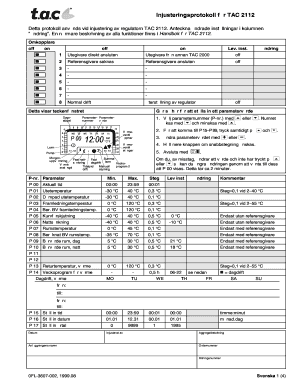
The Tac 2112 is a crucial document used for adjusting the regulator settings effectively. This guide provides comprehensive instructions on how to fill out the form online, ensuring clarity and ease of understanding for all users.
Follow the steps to fill out the Tac 2112 form easily.
- Press the ‘Get Form’ button to access the Tac 2112 form and open it in your chosen online editor.
- Begin by entering the name of the facility at the designated section.
- Provide the name of the person who is completing the adjustment in the 'Adjusted by' field.
- Fill in the equipment designation and order number where prompted.
- Adjust the parameters set forth by selecting each parameter number (P-nr.) from the list and entering the required values.
- Ensure to check the minimum, maximum, and step values for each parameter to avoid errors.
- Document any changes made in the 'Changes' column corresponding to the parameters.
- After confirming that all fields are filled accurately, use the function to save changes, or if necessary, download, print, or share the completed form.
Complete your Tac 2112 adjustments online today.
Industry-leading security and compliance
US Legal Forms protects your data by complying with industry-specific security standards.
-
In businnes since 199725+ years providing professional legal documents.
-
Accredited businessGuarantees that a business meets BBB accreditation standards in the US and Canada.
-
Secured by BraintreeValidated Level 1 PCI DSS compliant payment gateway that accepts most major credit and debit card brands from across the globe.