Loading
Get Annual Medical Form
How it works
-

Open form follow the instructions
-

Easily sign the form with your finger
-

Send filled & signed form or save
How to fill out the Annual Medical Form online
Completing the Annual Medical Form online is an essential process for documenting workplace health and safety. This guide provides clear, step-by-step instructions to help you accurately fill out each section of the form.
Follow the steps to successfully complete the Annual Medical Form online.
- Press the ‘Get Form’ button to access the Annual Medical Form and open it in your editor.
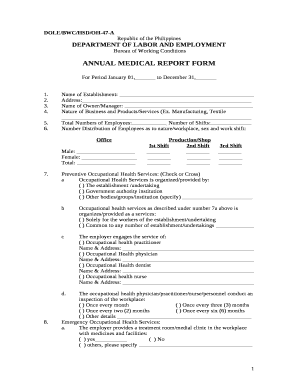
- Begin with the details of the establishment. Fill in the 'Name of Establishment' and 'Address' accurately. Ensure you correctly identify the 'Name of Owner/Manager' and specify the nature of the business along with total employee numbers.
- In the 'Number Distribution of Employees' section, indicate the number of male and female employees across different work shifts. This is important for compliance with occupational health regulations.
- Move to the 'Preventive Occupational Health Services' section. Mark the appropriate options to indicate how occupational health services are organized. Clearly specify if these services are solely for your establishment or shared with others.
- Provide details on the occupational health practitioner services engaged by your establishment. Include their names and contact information as required.
- Document the frequency of workplace inspections conducted by health personnel. Choose the appropriate options to reflect how often these inspections occur.
- Indicate whether an emergency treatment room or medical clinic is available at the workplace. Note the appropriate response and any additional specifications.
- Complete the attendance schedule for occupational health personnel, listing the hours they are present during each work shift.
- In the 'Occupational Health Services' section, indicate whether regular sanitation appraisals are conducted and document the number of employees who underwent various medical examinations.
- Fill in the details regarding reported diseases, including the number of cases for different categories. Ensure you specify male and female counts where applicable.
- Complete the report for occupational accidents and injuries, categorizing them and listing the total cases for men and women.
- Indicate the number of employees immunized for various vaccines and ensure this information is accurate and up to date.
- Check the status of keeping medical records and health education efforts within the organization, marking whether they have been completed.
- Finally, review all entries for accuracy. Once satisfied, you can save changes, download, print, or share the completed form as needed.
Begin completing the Annual Medical Form online today to ensure compliance and enhance workplace safety.
HIPAA doesn't apply to a troop. A scout troop is not a medical or health organization.