Loading
Get Samsung Customer Refund Acceptance Document
How it works
-

Open form follow the instructions
-

Easily sign the form with your finger
-

Send filled & signed form or save
How to fill out the Samsung Customer Refund Acceptance Document online
This guide provides clear instructions on how to complete the Samsung Customer Refund Acceptance Document online. By following these steps, you will be able to ensure that your refund request is processed accurately and efficiently.
Follow the steps to successfully complete your refund document.
- Click ‘Get Form’ button to obtain the form and open it in the editor for further processing.
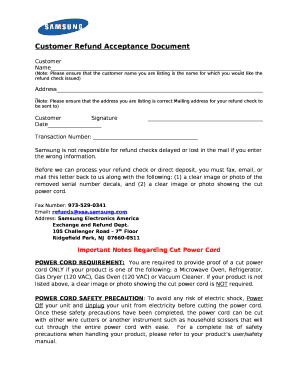
- In the 'Customer Name' field, enter the full name of the person for whom the refund check is to be issued. Ensure that the name is spelled correctly, as it will affect the refund process.
- In the 'Address' section, fill in the mailing address precisely where you wish the refund check to be sent. Double-check for accuracy to avoid delays.
- In the 'Transaction Number' field, provide the unique transaction number associated with your purchase. This number is crucial for identifying your refund request.
- Sign the document in the 'Customer Signature' field, confirming that you authorize the refund process. Below your signature, enter the date of signing.
- Prepare the required documents: take clear images or photos of the removed serial number decals and, if applicable, the cut power cord according to the product requirements.
- Once completed, you can either fax the document to 973-529-0341, email it to refunds@sea.samsung.com, or mail it to Samsung Electronics America at 105 Challenger Road, 7th Floor, Ridgefield Park, NJ 07660-0511.
- After submitting the form, keep a copy for your records. You can also save changes to the document, download it for safekeeping, or print a copy for your files.
Complete your Samsung Customer Refund Acceptance Document online today to initiate your refund process.
Mobiles, Tablets and Wearables In case the product is not working upon box opening or within 14 Days from the date of Phone Activation, please initiate a return request Samsung.com Orders section describing the issue. The Samsung service Centre will check the product to your satisfaction.