Loading
Get Pharmacy Use Only
How it works
-

Open form follow the instructions
-

Easily sign the form with your finger
-

Send filled & signed form or save
How to fill out the Pharmacy Use Only online
Filling out the Pharmacy Use Only form can be a straightforward process if you follow the proper guidelines. This guide will walk you through each section of the form, ensuring you can complete it accurately and efficiently.
Follow the steps to successfully fill out the form
- Press the ‘Get Form’ button to access the Pharmacy Use Only document and open it in your editing tool.
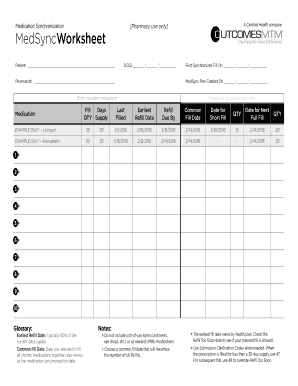
- Begin by entering the patient's information in the designated field, including their full name and date of birth (D.O.B.). Ensure accuracy to avoid any processing issues.
- Next, input the pharmacist's name in the specified area to identify the healthcare professional responsible for the medication synchronization.
- Record the date of the first synchronized fill and the date the MedSync plan was created. Ensure these dates are accurate to track medication schedules effectively.
- In this section, enter all medications included in the synchronization plan. For each medication, you should specify the fill days and quantity supply. Take time to double-check these details for clarity.
- Set the last filled date and determine the earliest refill date based on the patient's medication cycle. This information is crucial for maintaining the medication schedule.
- Select a common fill date that aims to synchronize all chronic medications. This is an important date for planning to optimize the patient's medication management.
- After completing all necessary fields, review the entire form for any omissions or errors.
- Finally, save your changes, download the document, print a copy for records, or share the completed form as needed.
Complete your Pharmacy Use Only form online today to enhance medication management.
Pharmacist-only or restricted medicines are a selection of medicines that can be purchased from a pharmacist without a doctor's prescription. They are not on display within a pharmacy and you cannot select them yourself.