Loading
Form preview
  • US Legal Forms
  • Form Library
  • More Forms
  • More Uncategorized Forms
  • Uat Sign Off Template

Get Uat Sign Off Template

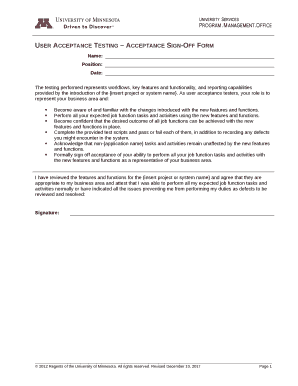
User Acceptance Testing Acceptance SignOff Form Name:Position:Date:The testing performed represents workflows, key features and functionality, and reporting capabilities provided by the introduction.

How it works

  1. Open form

    Open form follow the instructions

  2. Easily sign form

    Easily sign the form with your finger

  3. Share form

    Send filled & signed form or save

How to fill out the Uat Sign Off Template online

The Uat Sign Off Template is an essential document used to confirm user acceptance testing for new features and functions. This guide provides a clear, step-by-step approach to completing this template online, ensuring all necessary information is accurately captured.

Follow the steps to complete the Uat Sign Off Template online

  1. Click the ‘Get Form’ button to obtain the form and open it in your online editor.
  2. Begin by entering your name in the designated field at the top of the form. This identifies you as the user acceptance tester.
  3. In the position field, include your current job title to clarify your role within the testing process.
  4. Enter the date when the testing was completed. Ensure this reflects the actual day of submission.
  5. Review the testing performed, ensuring you are familiar with the workflows, key features, and functionality related to the project or system name. This contextual knowledge is crucial for accurate sign off.
  6. As you conduct your acceptance testing, complete the provided test scripts and document any defects or issues encountered in the system, making sure to note whether each script passed or failed.
  7. Acknowledge that tasks unrelated to the application remain unaffected by the new features and indicate your agreement with the statement provided in the form.
  8. Finally, formally sign off your acceptance by adding your signature at the bottom of the form, indicating your capacity to perform all job functions normally.
  9. After filling out all relevant fields, you can save your changes, download the completed document, print it, or share it with relevant stakeholders.

Complete your documents online today for efficient project management.

Get form

Experience a faster way to fill out and sign forms on the web. Access the most extensive library of templates available.
Get form

Related content

User Acceptance Test - NYC.gov
1, Test Report: User Acceptance Test - Document Info Project Name, Release ... ,...
Learn more
User Acceptance Testing Sign-Off Form - University...
User Acceptance Testing – Acceptance Sign-Off Form. Name: Position: Date: The testing...
Learn more
Acceptance testing - Wikipedia
In engineering and its various subdisciplines, acceptance testing is a test conducted to...
Learn more

Related links form

Wheeler High Football Physical Forms Printable ZYGLO ZR-10C CLP SDS VER 16-1 01-04-2016.pdf - MagnaFlux ... - Magdoc American Canoe Association Waiver And Release Of Liability - Bayou ... WeCAB Driver/Dispatcher Application - Wecab

Questions & Answers

Get answers to your most pressing questions about US Legal Forms API.

Contact support

Criteria for QA sign-off. Execute every necessary test plan. The software should satisfy the client's needs. The appropriate level of coverage should be met. You should complete all of the essential tasks. All of the high-priority test cases and test plans should execute successfully.

For a typical mid-size enterprise learning module implementation or LMS migration, UAT should take two weeks of dedicated testing with at least one additional week to accommodate re-testing scenarios where issues were found and then resolved.

What are the Legitimate Prerequisites for User Acceptance Testing? Access to business requirements. A fully developed software code base. Completed unit, integration, and system testing. There should be no high or medium defects or showstoppers in integration testing. Regression testing shouldn't lead to any major bugs.

– User acceptance testing. A formal signoff after UAT shows that the customer agrees that they have thoroughly tested the solution and that they agree that it is bug-free and ready for deployment.

The commonly considered exit criteria for terminating or concluding the process of testing are: Deadlines meet or budget depleted. Execution and updating of all test cases. Desired and sufficient coverage of the requirements and functionalities under the test.

Short Description A User Acceptance Testing (UAT) Sign off is a document to record the acknowledgement of the participants that carried out the test cases for a specific project prototype. This document also confirms the development of the requirements that have been initially agreed upon.

Following are the exit criteria for User Acceptance Testing: No show stoppers, high & medium defects open. Smooth working of business process. UAT Sign off meeting with stakeholders.

Get This Form Now!

Use professional pre-built templates to fill in and sign documents online faster. Get access to thousands of forms.
Get form
If you believe that this page should be taken down, please follow our DMCA take down processhere.

Industry-leading security and compliance

US Legal Forms protects your data by complying with industry-specific security standards.
  • In businnes since 1997
    25+ years providing professional legal documents.
  • Accredited business
    Guarantees that a business meets BBB accreditation standards in the US and Canada.
  • Secured by Braintree
    Validated Level 1 PCI DSS compliant payment gateway that accepts most major credit and debit card brands from across the globe.
Get Uat Sign Off Template
Get form
  • Adoption
  • Bankruptcy
  • Contractors
  • Divorce
  • Home Sales
  • Employment
  • Identity Theft
  • Incorporation
  • Landlord Tenant
  • Living Trust
  • Name Change
  • Personal Planning
  • Small Business
  • Wills & Estates
  • Packages A-Z
  • Affidavits
  • Bankruptcy
  • Bill of Sale
  • Corporate - LLC
  • Divorce
  • Employment
  • Identity Theft
  • Internet Technology
  • Landlord Tenant
  • Living Wills
  • Name Change
  • Power of Attorney
  • Real Estate
  • Small Estates
  • Wills
  • All Forms
  • Forms A-Z
  • Form Library
  • Legal Hub
  • About Us
  • Help Portal
  • Legal Resources
  • Blog
  • Affiliates
  • Contact Us
  • Delete My Account
  • Site Map
  • Industries
  • Forms in Spanish
  • Localized Forms
  • State-specific Forms
  • Forms Kit
  • Real Estate Handbook
  • All Guides
  • Notarize
  • Incorporation services
  • For Consumers
  • For Small Business
  • For Attorneys
  • USLegal
  • FormsPass
  • pdfFiller
  • signNow
  • altaFlow
  • DocHub
  • Instapage
Form Packages
  • Adoption
  • Bankruptcy
  • Contractors
  • Divorce
  • Home Sales
  • Employment
  • Identity Theft
  • Incorporation
  • Landlord Tenant
  • Living Trust
  • Name Change
  • Personal Planning
  • Small Business
  • Wills & Estates
  • Packages A-Z
Form Categories
  • Affidavits
  • Bankruptcy
  • Bill of Sale
  • Corporate - LLC
  • Divorce
  • Employment
  • Identity Theft
  • Internet Technology
  • Landlord Tenant
  • Living Wills
  • Name Change
  • Power of Attorney
  • Real Estate
  • Small Estates
  • Wills
  • All Forms
  • Forms A-Z
  • Form Library
Customer Service
  • Legal Hub
  • About Us
  • Help Portal
  • Legal Resources
  • Blog
  • Affiliates
  • Contact Us
  • Delete My Account
  • Site Map
  • Industries
  • Forms in Spanish
  • Localized Forms
  • State-specific Forms
  • Forms Kit
Legal Guides
  • Real Estate Handbook
  • All Guides
Prepared for you
  • Notarize
  • Incorporation services
Our Customers
  • For Consumers
  • For Small Business
  • For Attorneys
Our Sites
  • USLegal
  • FormsPass
  • pdfFiller
  • signNow
  • altaFlow
  • DocHub
  • Instapage
Social Media
Call us now toll free:
+1 833 426 79 33
As seen in:
© Copyright 1999-2026 airSlate Legal Forms, Inc. 3720 Flowood Dr, Flowood, Mississippi 39232
  • Your Privacy Choices
  • Terms of Service
  • Privacy Notice
  • Content Takedown Policy
  • Bug Bounty Program