We use cookies to improve security, personalize the user experience, enhance our marketing activities (including cooperating with our marketing partners) and for other business use.
Click "here" to read our Cookie Policy. By clicking "Accept" you agree to the use of cookies. Read less
Read more
Accept
Loading
Form preview
  • US Legal Forms
  • Form Library
  • More Forms
  • More Uncategorized Forms
  • Guide For Meis Application Filing

Get Guide For Meis Application Filing

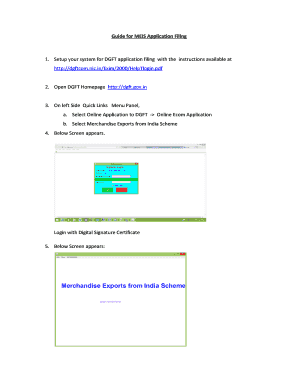
Guide for MEIS Application Filing1. Setup your system for DGFT application filing with the instructions available at http://dgftcom.nic.in/Exim/2000/HelpTlogin.pdf2. Open DGFT Homepage http://dgft.gov.in3.

How it works

  1. Open form

    Open form follow the instructions

  2. Easily sign form

    Easily sign the form with your finger

  3. Share form

    Send filled & signed form or save

How to fill out the Guide for Meis Application Filing online

This guide provides detailed instructions on how to effectively fill out the Guide for Meis Application Filing online. Whether you are new to the process or looking for a refresher, these step-by-step instructions will help you navigate the application with ease.

Follow the steps to complete your application efficiently.

  1. Click the ‘Get Form’ button to obtain the form and open it in your preferred editor.
  2. Set up your system for DGFT application filing by following the instructions available in the provided link. Make sure your setup is complete before proceeding.
  3. Open the DGFT Homepage and look for the Quick Links Menu Panel on the left side. Select the option for Online Application to DGFT and then choose Online Ecom Application.
  4. Select the Merchandise Exports from India Scheme from the available options.
  5. Login using your Digital Signature Certificate to proceed further.
  6. To attach a Shipping Bill to your MEIS application, follow the detailed instructions for the Shipping Bill Repository provided in the linked resources.
  7. Create your MEIS application by navigating to the File menu and selecting Create. An Ecom Reference Number will be generated; click OK to confirm.
  8. In the MEIS application Main Screen, select the Export License Period based on the LEO Date from the drop-down menu, then choose the Port of Registration.
  9. Click the Add button, and a message will appear confirming your selection.
  10. Click on the SB REPOSITORY button to select and attach eligible Shipping Bills. Move the selected shipping bills to the right panel and click OK.
  11. Remember that it is mandatory to include at least one Shipping Bill for the Port of Registration you have selected. You can attach a maximum of 50 shipping bills per application.
  12. If you need to attach disallowed Shipping Bills, use the provided box to input the disallowed SB No and check the box to attach them accordingly.
  13. For shipping bills containing handicraft items, ensure you select the appropriate checkbox which triggers the recalculation of MEIS benefits.
  14. Proceed by clicking the PAY ONLINE button and complete the online payment process.
  15. After payment, click on VERIFY PAY to ensure your transaction is verified.
  16. Finally, click on the Submit button, select the DGFT Regional Office where your application will be submitted, and click Generate.
  17. A document will appear; select it and click Submit. To finalize, click on SIGN AND SUBMIT to complete your application submission. A file number will be displayed acknowledging your submission.

Start filling out your MEIS application online today to ensure your submissions are timely and accurate.

Get form

Experience a faster way to fill out and sign forms on the web. Access the most extensive library of templates available.
Get form

Related content

MDE - Guidance on Electronic Filing of Financial...
Districts need submit only one audit, which will meet the needs of each of these...
Learn more
Undergraduate Application Procedures < San...
Applicants must file applications for admission to an impacted program during the ... The...
Learn more
OVEN - PartSelect
If the Anti--tip device supplied with the range does not fit this application, use the...
Learn more

Related links form

Family Doctor Services Registration - Stgilessurgerycouk - Stgilessurgery Co CarSim Problems Dynamic Loads 1) The CarSim Big SUV ... Season Ticket Application Form 201213 - Official Website OEL Report For Purchase Surface Water System - The Oklahoma Bb - Deq State Ok

Questions & Answers

Get answers to your most pressing questions about US Legal Forms API.

Contact support

A scheme designed to provide rewards to exporters to offset infrastructural inefficiencies and associated costs. The Duty Credit Scrips and goods imported/ domestically procured against them shall be freely transferable.

Services under MEIS Apply for MEIS Scheme. To apply for MEIS scheme, an IEC is required. ... MEIS Rate Query. Check the MEIS rates. ... View Ownership. View the ownership of the scrips. ... Record Scrip Transfer Information. Record the scrip transfer information. ... License Status at DGFT. ... License Status at Customs.

MEIS has been introduced to promote export of notified goods manufactured/produced in India. The scheme aims to rationalise the incentives by bringing more and more products under its ambit so as to make a larger number of Indian products competitive in the international market.

Merchandise Export from India Scheme (MEIS) Under the MEIS Scheme, certain rewards and incentives are given to exporters. Such incentives are given to exporters at a specified rate which varies from product to product and from country to country.

Service Exports from India Scheme (SEIS) was introduced on 1st April 2015 to encourage the export of notified services from India. SEIS focuses on promoting the export of services from India by providing a duty credit scrip for eligible exports. Duty credit scrips are ed as rewards under SEIS.

MEIS Incentive The incentives under the schemes are calculated as a percentage, which is 2%, 3% or 5% of the realised FOB (free-on-board) value exports in free foreign exchange or FOB value of exports as per shipping bills in free foreign exchange. The incentives are allotted through a MEIS duty credit scrip.

EOU/EHTP/STP/BTP Schemes EOU Scheme [Export-oriented Units] is accessible to units that are only engaged with exporting activities. This scheme came to effect in 1981, and it aims at increasing export activities in the country.

Get This Form Now!

Use professional pre-built templates to fill in and sign documents online faster. Get access to thousands of forms.
Get form
If you believe that this page should be taken down, please follow our DMCA take down processhere.

Industry-leading security and compliance

US Legal Forms protects your data by complying with industry-specific security standards.
  • In businnes since 1997
    25+ years providing professional legal documents.
  • Accredited business
    Guarantees that a business meets BBB accreditation standards in the US and Canada.
  • Secured by Braintree
    Validated Level 1 PCI DSS compliant payment gateway that accepts most major credit and debit card brands from across the globe.
Get Guide For Meis Application Filing
Get form
Form Packages
Adoption
Bankruptcy
Contractors
Divorce
Home Sales
Employment
Identity Theft
Incorporation
Landlord Tenant
Living Trust
Name Change
Personal Planning
Small Business
Wills & Estates
Packages A-Z
Form Categories
Affidavits
Bankruptcy
Bill of Sale
Corporate - LLC
Divorce
Employment
Identity Theft
Internet Technology
Landlord Tenant
Living Wills
Name Change
Power of Attorney
Real Estate
Small Estates
Wills
All Forms
Forms A-Z
Form Library
Customer Service
Terms of Service
Privacy Notice
Legal Hub
Content Takedown Policy
Bug Bounty Program
About Us
Help Portal
Legal Resources
Blog
Affiliates
Contact Us
Delete My Account
Site Map
Industries
Forms in Spanish
Localized Forms
State-specific Forms
Forms Kit
Legal Guides
Real Estate Handbook
All Guides
Prepared for You
Notarize
Incorporation services
Our Customers
For Consumers
For Small Business
For Attorneys
Our Sites
US Legal Forms
USLegal
FormsPass
pdfFiller
signNow
altaFlow
DocHub
Instapage
Social Media
Call us now toll free:
+1 833 426 79 33
As seen in:
  • USA Today logo picture
  • CBC News logo picture
  • LA Times logo picture
  • The Washington Post logo picture
  • AP logo picture
  • Forbes logo picture
© Copyright 1997-2025
airSlate Legal Forms, Inc.
3720 Flowood Dr, Flowood, Mississippi 39232
Form Packages
Adoption
Bankruptcy
Contractors
Divorce
Home Sales
Employment
Identity Theft
Incorporation
Landlord Tenant
Living Trust
Name Change
Personal Planning
Small Business
Wills & Estates
Packages A-Z
Form Categories
Affidavits
Bankruptcy
Bill of Sale
Corporate - LLC
Divorce
Employment
Identity Theft
Internet Technology
Landlord Tenant
Living Wills
Name Change
Power of Attorney
Real Estate
Small Estates
Wills
All Forms
Forms A-Z
Form Library
Customer Service
Terms of Service
Privacy Notice
Legal Hub
Content Takedown Policy
Bug Bounty Program
About Us
Help Portal
Legal Resources
Blog
Affiliates
Contact Us
Delete My Account
Site Map
Industries
Forms in Spanish
Localized Forms
State-specific Forms
Forms Kit
Legal Guides
Real Estate Handbook
All Guides
Prepared for You
Notarize
Incorporation services
Our Customers
For Consumers
For Small Business
For Attorneys
Our Sites
US Legal Forms
USLegal
FormsPass
pdfFiller
signNow
altaFlow
DocHub
Instapage
Social Media
Call us now toll free:
+1 833 426 79 33
As seen in:
  • USA Today logo picture
  • CBC News logo picture
  • LA Times logo picture
  • The Washington Post logo picture
  • AP logo picture
  • Forbes logo picture
© Copyright 1997-2025
airSlate Legal Forms, Inc.
3720 Flowood Dr, Flowood, Mississippi 39232