Loading
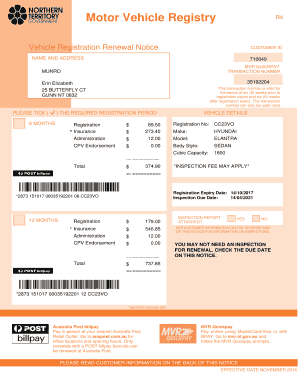
Get Erin Elizabeth
How it works
-

Open form follow the instructions
-

Easily sign the form with your finger
-

Send filled & signed form or save
How to fill out the Erin Elizabeth online
Filling out the Erin Elizabeth form is a straightforward process that guides you through necessary information for vehicle registration renewal. This guide aims to provide clear, step-by-step instructions to ensure you complete the form accurately and efficiently.
Follow the steps to successfully complete your Erin Elizabeth form.
- Click the ‘Get Form’ button to obtain the Erin Elizabeth form and open it in your chosen editor.
- Begin by filling in your customer ID, which is listed at the top of the notice. This will help identify your account.
- Next, provide your name and residential address. Ensure that this information is current to avoid any issues with your registration.
- Choose the required registration period by ticking the corresponding box for either 6 months or 12 months. This selection will affect your total payment amount.
- Review the registration fee, insurance, administration fees, and total amount due as indicated on the form. Ensure all amounts are correct.
- Fill in the vehicle details section, including registration number, make, model, body style, and cubic capacity. Accuracy here is crucial for your renewal.
- Indicate whether an inspection report is attached. If an inspection is required, ensure that any relevant reports are included.
- If payment is being made by credit card, fill in the payment section, including the card number, expiration date, and the name of the cardholder.
- If your address has changed, provide the new residential and postal addresses in the designated sections.
- To opt for electronic renewal notices, select 'yes' or 'no' and include your email address if applicable.
- Once all sections are filled out correctly, take time to review the entire form for any errors. Make necessary adjustments.
- Finally, save your changes, download the completed form, print it, or share it as needed to finalize your registration process.
Complete your documents online for a smoother registration experience.