Loading
Get E-mail To: Finanunisa
How it works
-

Open form follow the instructions
-

Easily sign the form with your finger
-

Send filled & signed form or save
How to fill out the E-MAIL TO: Finanunisa online
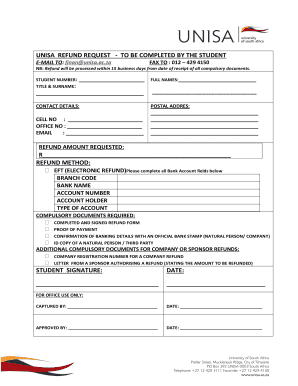
This guide provides a clear and structured approach to completing the E-MAIL TO: Finanunisa form online for refund requests. Follow these instructions to ensure all necessary information is submitted accurately and efficiently.
Follow the steps to successfully complete the form.
- Press the ‘Get Form’ button to access the form and open it in your chosen digital editor.
- Begin by entering your student number in the designated field. Ensure that this number is accurate to avoid processing delays.
- Provide your title and surname in the respective fields. This information should match your official records.
- Fill in your full names in the line designated for that purpose. Ensure that you include all given names.
- Enter your contact details accurately. Include your postal address, cell number, office number, and email address. Double-check for accuracy to facilitate communication.
- Indicate the refund amount requested in the appropriate section. Be sure to provide the amount in South African Rand (R).
- Select your preferred refund method by checking the box for EFT (Electronic Refund).
- Complete all bank account fields: branch code, bank name, account number, account holder, and type of account. This information is essential for processing the refund.
- Review the list of compulsory documents required and ensure you have the following: completed and signed refund form, proof of payment, confirmation of banking details, and a copy of the ID of a natural person or third party if applicable.
- If the refund is for a company or sponsor, ensure that you have additional documents like the company registration number and a letter from the sponsor authorizing the refund.
- Sign the form in the designated area, and include the date of signing.
- Once all sections are filled out and reviewed, proceed to save changes, download a copy of the completed form, print it, or share it as necessary.
Complete your documents online now to ensure prompt processing of your refund request.
You can also contact us via e-mail: edu-enquiries@unisa.ac.za.