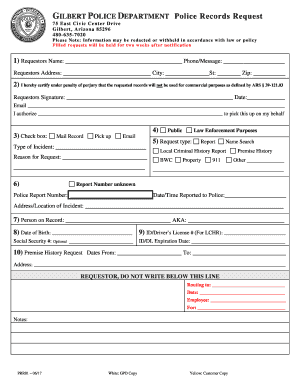
Requests for other public information within the Police Department are also processed through the Records Section. Obtain Copies of Police Reports and Other .

How it works
  • Open form

    Open form follow the instructions

  • Easily sign form

    Easily sign the form with your finger

  • Share form

    Send filled & signed form or save

How to fill out the Gilbert Police Records online

Filling out the Gilbert Police Records request form online can streamline the process of obtaining necessary police documentation. This guide will walk you through each step to ensure you provide all required information accurately.

Follow the steps to complete your police records request.

  1. Click ‘Get Form’ button to obtain the form and open it in the editor.
  2. Begin by entering your name in the requestor's name field, followed by your phone number, and your complete address including city, state, and zip code.
  3. In the certification section, confirm that you will not use the requested records for commercial purposes by marking the appropriate box and providing your signature and date.
  4. Decide how you would like to receive the records by checking the box next to mail record, pick up, or email options.
  5. Specify the type of incident and the reason for your request in the respective fields. Be as detailed as possible to help process your request.
  6. Select the request type from the provided options. This may include report, name search, local criminal history report, or other categories. Provide a report number if available.
  7. Enter the person on record's name and any aliases they may have. Enter the date of birth and, if applicable, their ID or driver’s license number. The Social Security number is optional.
  8. If applicable, enter the expiration date of the ID or driver's license.
  9. For premise history requests, enter the dates you are interested in and the relevant address.
  10. Once all necessary fields are filled, review all information for accuracy. Save your changes, and download or print the form for submission.

Complete your police records request online today for a fast and efficient service.

Get form

Experience a faster way to fill out and sign forms on the web. Access the most extensive library of templates available.

Related content

Police Records Requests | Town of Gilbert, Arizona

In person; US Mail: 75 E. Civic Center Drive, Gilbert, AZ 85296; Online: External Public...

Learn more
gilbert police department - Town of Gilbert

gilbert police department | fy 13/14 annual report. - 3 - about the department mission &...

Learn more
Loss of rights due to conviction for criminal...

Loss of rights due to criminal conviction refers to the practice in some countries of...

Learn more
Questions & Answers

Get answers to your most pressing questions about US Legal Forms API.

Contact support

Are police reports public record in Arizona?

In Arizona, police records are considered public records and as such, must be made accessible to the public.

*If you have an emergency, please call 911. Do not use this form to report "in-progress" activities or if you need to file an official police report, please call the police department at (480) 503-6500 (TTY: (480) 503-6505).

GPD is encouraging any additional victims or anyone with information to call 480-503-6500. Gilbert Police Dept. Gilbert Police Dept.

Police reports may be obtained in the following ways: Online: External Public Records Request Form. US Mail: 75 E. Civic Center Drive, Gilbert, AZ 85296. In Person (inquire at the information window)

You can now request these records under the Public Records Act ("PRA") — a law that gives the public the right to see the non-confidential documents of our state and local government agencies.

To request an incident report only, please submit the request through the MCSO Departmental Reports Section here....Request Other MCSO Public Records E-mail to: LLSAdmin@mcso.maricopa.gov. Fax to: (602) 876-0056. Mail/deliver in person to: 550 W. Jackson St., Phoenix, AZ 85003.

Requests can be received via email at dru@azdps.gov or via fax at (602) 223-2915. Note: If you are NOT a Law Enforcement Agency, and are requesting an Arrest/Offense/Incident Report, contact the DPS Public Records Unit.

Get This Form Now!

Use professional pre-built templates to fill in and sign documents online faster. Get access to thousands of forms.

If you believe that this page should be taken down, please follow our DMCA take down process here.

Get Gilbert Police Records