Loading
Get Tn Hs-1949 2011-2026
How it works
-

Open form follow the instructions
-

Easily sign the form with your finger
-

Send filled & signed form or save
How to fill out the TN HS-1949 online
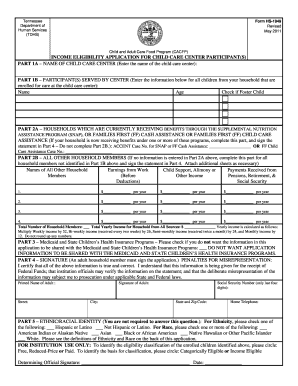
This guide provides a comprehensive overview of how to fill out the TN HS-1949 form accurately and efficiently. Designed for the Child and Adult Care Food Program, this form is crucial for determining eligibility for meal reimbursements at child care centers.
Follow the steps to complete the TN HS-1949 online
- Click ‘Get Form’ button to obtain the form and open it in your preferred editor.
- In Part 1A, enter the name of the child care center where the children are enrolled.
- Proceed to Part 1B and list the names and ages of all children from your household enrolled at the center. Additionally, check the box if any of these children are foster children.
- In Part 2A, if your household is receiving benefits through the Supplemental Nutrition Assistance Program (SNAP) or Families First assistance, enter your ACCENT case number for the appropriate program. Skip to Part 4 after this.
- If not using Part 2A, complete Part 2B, which requires you to list all other household members not identified in Part 1B. Provide their names and the yearly earnings from work, child support, alimony, and other income sources.
- Calculate the total number of household members and the total yearly income from all sources. Ensure that all figures are accurate as this information will determine eligibility.
- Move to Part 3 to indicate whether or not you consent to share the information with Medicaid and State Children’s Health Insurance Programs.
- In Part 4, an adult household member must sign the application. This section also requires the last four digits of their Social Security number, or to indicate that they do not have one.
- Finally, review the entire application for completeness and accuracy. You can now save your changes, download, print, or share the completed form.
Complete your TN HS-1949 application online today to ensure timely processing of your benefits.
To file your TN annual report, begin by gathering your business information and visiting the Tennessee Secretary of State’s website. You can choose to file online for convenience, or mail a paper form if you prefer. Ensure you review all the necessary details to avoid mistakes. Resources like TN HS-1949 from US Legal Forms can help make the filing process more manageable.