Loading
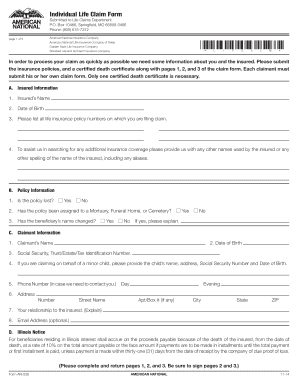
Get Box 10466, Springfield, Mo 65808-0466
How it works
-

Open form follow the instructions
-

Easily sign the form with your finger
-

Send filled & signed form or save
How to use or fill out the Box 10466, Springfield, MO 65808-0466 online
This guide provides a comprehensive overview of how to fill out the Box 10466, Springfield, MO 65808-0466 form online. Whether you are new to digital document management or seeking to file a claim effectively, this resource is designed to support you through the process.
Follow the steps to complete the form accurately and efficiently.
- Press the ‘Get Form’ button to access the online version of the Box 10466 form. Once you have obtained the form, open it in your preferred digital document editor.
- Begin filling out Section A, which requires information about the insured. Provide the insured's full name, date of birth, and all relevant life insurance policy numbers.
- Continue with Section A. If applicable, indicate any other names or spellings used by the insured, including aliases, to assist in locating additional coverage.
- In Section B, respond to questions related to the policy information, such as whether the policy is lost or has been assigned to a mortuary, funeral home, or cemetery.
- Proceed to Section C to input claimant information. Provide your name, date of birth, Social Security number or tax identification number, and a contact number where you can be reached.
- If claiming on behalf of a minor, complete the additional fields for the minor's name, address, Social Security number, and date of birth.
- Fill out your relationship to the insured in the designated field and provide an email address if you choose to include one.
- Review the Illinois Notice section if you are a beneficiary residing in Illinois, ensuring you understand the stipulations regarding interest on claims.
- Sign the authorization section to allow necessary access to and sharing of medical information related to the claim. This is crucial for the processing of your claim.
- Complete the Method of Payment Requested section, selecting between a lump sum or other payment options, and providing the related details.
- Review all sections for accuracy. Ensure that you have filled out all required fields, provided proper signatures, and dated the necessary sections.
- Finally, save your changes to the completed form. You can download, print, or share your finalized claim form as needed before submission.
Start filling out your Box 10466 form online now to streamline your claim process.
Related links form
July 2, 2020. American National Insurance Company has finalized its previously announced reorganization, resulting in a newly-created holding company named “American National Group, Inc.” The holding company is a Delaware corporation and is now the parent company of American National Insurance Company.