Loading
Get Paylocity Paystubs
How it works
-

Open form follow the instructions
-

Easily sign the form with your finger
-

Send filled & signed form or save
How to fill out the Paylocity Paystubs online
This guide provides step-by-step instructions to help you navigate the Paylocity Paystubs online. Whether you are accessing your pay stubs for the first time or updating your personal information, these clear instructions will assist you in the process.
Follow the steps to successfully fill out the Paylocity Paystubs online.
- Click ‘Get Form’ button to obtain the form and open it for editing.
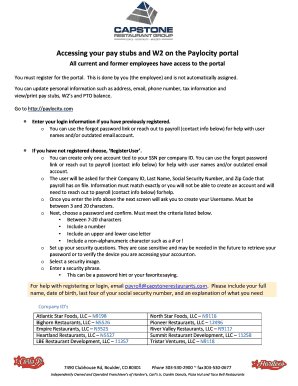
- If you are a current or former employee, ensure that you have registered for the Paylocity portal. If you have already registered, enter your login information. To recover your password, use the 'forgot password' link or contact payroll for assistance.
- If you have not registered yet, select ‘Register User’ to initiate the registration process. You may only create one account associated with your SSN per company ID.
- Input the required details such as your Company ID, Last Name, Social Security Number, and Zip Code. Ensure all information aligns precisely with payroll records.
- Follow the prompts to create a Username that is between 3 and 20 characters.
- Choose a secure password and confirm it. The password must be between 7-20 characters, include at least one number, and contain both upper and lower case letters as well as a non-alphanumeric character (e.g., # or !).
- Set up your security questions, noting they are case sensitive and may be necessary for future password retrieval or device verification.
- Select a security image and enter a security phrase, which can serve as a password hint or your favorite saying.
- Once logged in, you can view, print, or save your pay stubs and W2s and update any necessary personal information.
Access your Paylocity pay stubs online today to manage your payroll information efficiently.
Select the "Pay" tab and click "Checks." Select the date of the paycheck and click “Download Paystub.” If you need to print multiple, select all the days you need and select “View Summary.” Right click on your summary and select “Print.”