Loading
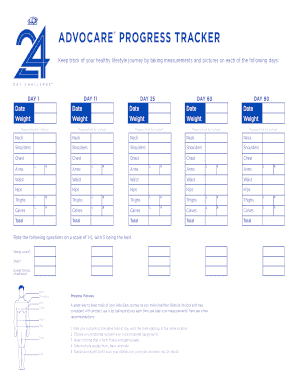
Get Advocare Progress Tracker
How it works
-

Open form follow the instructions
-

Easily sign the form with your finger
-

Send filled & signed form or save
How to fill out the ADVOCARE PROGRESS TRACKER online
The ADVOCARE PROGRESS TRACKER is an essential tool for individuals committed to tracking their health and wellness journey. This guide provides clear, step-by-step instructions for completing the form online, ensuring users can effectively monitor their progress.
Follow the steps to complete your progress tracker.
- Press the ‘Get Form’ button to access the ADVOCARE PROGRESS TRACKER form and open it in your preferred online editor.
- Begin with DAY 1. Enter the date and your weight in the corresponding fields. Take note of your weight for future reference.
- Continue with the measurements section. Input your measurements in inches for neck, shoulders, chest, waist, hips, thighs, and calves as applicable. Repeat this process for DAY 11, DAY 25, DAY 60, and DAY 90.
- For each measurement day, ensure all data, including date and weight, are accurately entered. Use the scale provided to rate your sleep, overall feeling of wellness, and energy levels on a scale of 1-5.
- Take progress pictures following the guidelines provided. Ensure consistency in timing, location, and clothing to accurately reflect your journey.
- Review all entered information for accuracy. Once complete, users can save changes, download, print, or share the form as needed.
Start tracking your health journey by completing the ADVOCARE PROGRESS TRACKER online today.