Loading
Get Outpatient Therapy Prior Authorization
How it works
-

Open form follow the instructions
-

Easily sign the form with your finger
-

Send filled & signed form or save
How to fill out the Outpatient Therapy Prior Authorization online
Completing the Outpatient Therapy Prior Authorization request form is a crucial step in ensuring that the necessary therapy services are approved. This guide provides you with detailed instructions to fill out the form accurately and efficiently online.
Follow the steps to complete your Outpatient Therapy Prior Authorization request.
- Click the ‘Get Form’ button to obtain the form and open it in the editor for online completion.
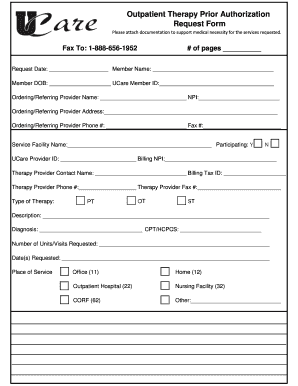
- Start by filling out the request date and the member's name. Ensure that all personal information is accurate to avoid delays in processing.
- Enter the UCare Member ID and date of birth for the member receiving therapy services. Accuracy in this section is vital as it identifies the member in the system.
- Provide the National Provider Identifier (NPI) for both the ordering/referring provider and the therapy provider. This information helps in verifying provider credentials.
- Complete the ordering/referring provider's name, address, phone number, and fax number. This information should reflect the provider's official contact details.
- Indicate the service facility name and whether it is participating by selecting 'Yes' or 'No.' This clarifies the therapy setting for the requested services.
- Fill in the therapy provider’s contact name, phone number, and fax number to facilitate communication regarding the authorization request.
- Select the type of therapy being requested: Physical Therapy (PT), Occupational Therapy (OT), or Speech Therapy (ST).
- Provide a detailed description of the therapy services requested and the diagnosis. This section is important for demonstrating medical necessity.
- Fill in the CPT/HCPCS codes that correspond to the services being requested. These codes are crucial for proper billing and processing.
- Indicate the number of units or visits requested, as well as the specific date(s) when these services will be provided.
- Select the place of service, such as Office (11), Home (12), Outpatient Hospital (22), Nursing Facility (32), CORF (62), or Other. This specifies where the therapy will take place.
- Finally, review all entries for completeness and accuracy. Once verified, you can save changes, download, print, or share the completed form as needed.
Start the process of submitting your Outpatient Therapy Prior Authorization request online today.
Examples of the more common health care services that may require prior authorization include: Planned admission to a hospital or skilled nursing facilities. Surgeries. Advanced imaging, such as MRIs and CT scans. Transplant and donor services. Non-emergency air ambulance transport. Medical equipment.