Loading
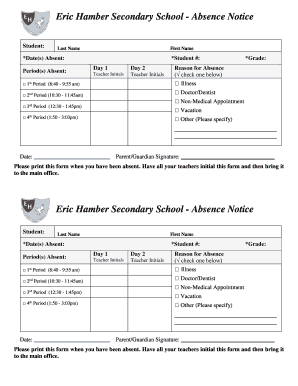
Get Eric Hamber Absence Form
How it works
-

Open form follow the instructions
-

Easily sign the form with your finger
-

Send filled & signed form or save
How to fill out the Eric Hamber Absence Form online
The Eric Hamber Absence Form provides a structured approach for reporting a student's absence from school. This guide will assist you in understanding how to complete each section of the form accurately and efficiently.
Follow the steps to effectively fill out the form online.
- Use the ‘Get Form’ button to access the absence form online and open it in your selected editor.
- Begin by entering the student's last name in the designated field.
- Next, input the student's first name.
- Fill in the *date(s) absent field to indicate all days the student was not present.
- In the *period(s) absent section, select the applicable periods by checking the appropriate boxes, including 1st through 4th period.
- Enter the student's unique student number in the specified field.
- Indicate the student's grade by filling in the grade field.
- Choose the reason for absence by checking one of the options provided, such as illness, doctor/dentist, non-medical appointment, vacation, or other. If selecting 'other,' specify the reason in the space provided.
- Ensure all required information is completed before signing and dating the form.
- Once all sections are filled out, save any changes you made, and you may choose to download, print, or share the filled-out form as needed.
Complete the Eric Hamber Absence Form online to streamline the absence reporting process.
Related links form
On May 1, 1936, he became Lieutenant Governor of British Columbia, achieving considerable popularity. He left office in 1941 and accepted the position of Chancellor of the University of British Columbia in 1944, a position he held for seven years.