Loading
Get Grievance Log
How it works
-

Open form follow the instructions
-

Easily sign the form with your finger
-

Send filled & signed form or save
How to fill out the Grievance Log online
Filling out the Grievance Log online is essential for documenting concerns effectively. This guide provides clear instructions for each section, ensuring you can complete the form accurately and efficiently.
Follow the steps to complete the Grievance Log.
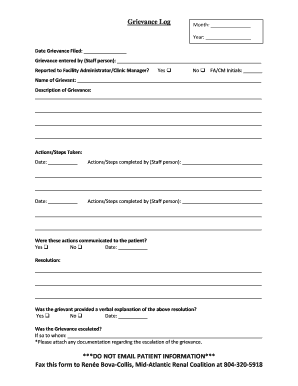
- Press the ‘Get Form’ button to access the Grievance Log. This action will enable you to open the form and proceed with filling it out.
- Enter the month and year at the top of the form. This information helps track the timing of the grievance.
- Record the date the grievance was filed. This date is crucial for establishing the timeline of events.
- Indicate the name of the staff person who entered the grievance in the provided field.
- Select whether the grievance was reported to the Facility Administrator or Clinic Manager by choosing 'Yes' or 'No.'
- Enter the initials of the Facility Administrator or Clinic Manager responsible for overseeing the grievance.
- Provide the name of the grievant in the designated area. This ensures that the concerned individual is appropriately identified.
- Detail the description of the grievance in the provided section. Ensure you cover all relevant aspects of the situation.
- List the actions or steps taken regarding the grievance. Include the dates and the names of the staff persons who completed these actions.
- Indicate whether these actions were communicated to the patient by selecting 'Yes' or 'No.'
- Record the resolution details in the corresponding section. This should encompass how the grievance was addressed.
- Confirm if the grievant was provided with a verbal explanation of the resolution. Choose 'Yes' or 'No.'
- State whether the grievance was escalated and indicate to whom it was escalated. Attach any relevant documentation.
- Once you have completed all sections, save your changes. You can download, print, or share the Grievance Log as needed.
Start filling out your Grievance Log online today to ensure all concerns are formally documented and addressed.
What are the three types of grievances? Individual Grievances. When an individual employee grieves against a management action like demotion based on bias, non payment of salary, workplace harassment etc. Group Grievances. ... Union Grievances.