Loading
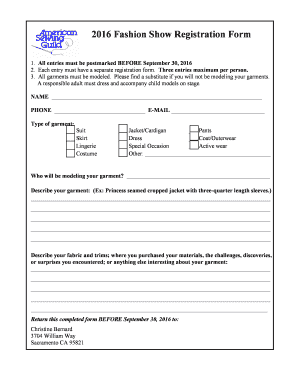
Get Fashion Show Registration Form Sample
How it works
-

Open form follow the instructions
-

Easily sign the form with your finger
-

Send filled & signed form or save
How to fill out the Fashion Show Registration Form Sample online
Registering for a fashion show is an exciting opportunity to showcase your creativity. This guide provides clear instructions to help you complete the Fashion Show Registration Form Sample online efficiently.
Follow the steps to complete your registration form online.
- Click ‘Get Form’ button to obtain the form and open it in the editor.
- Begin by entering your name in the designated field. This information is essential for identifying your registration.
- Provide your phone number and email address for communication purposes. Make sure both are accurate to avoid any contact issues.
- Indicate the type of garment you are entering by selecting one or more options from the list provided. This helps categorize your entry appropriately.
- Detail who will be modeling your garment. It is important to ensure that someone is available to wear the garment on stage during the show.
- In the description section, provide a detailed account of your garment. Mention key features such as style, cut, and any unique elements.
- Describe your fabric and trims, including where the materials were purchased and any interesting experiences during the creation of your garment. This gives judges insight into your design process.
- Once you have filled out all necessary fields, review the form carefully for accuracy. Ensure that all information is complete.
- You can save your changes, download the form, or print it. Follow any additional instructions provided for submitting your registration.
Get started on completing your Fashion Show Registration Form online today!
Responsive Registration Form HTML CSS Step 1: Basic structure of registration form. ... Step 2: Add headings to the form. ... Step 3: Create a box to input the name. ... Step 3: Create email and phone no input boxes. ... Step 4: Create a select box in the Registration Form. ... Step 5: Create a button in the HTML registration form.