Loading
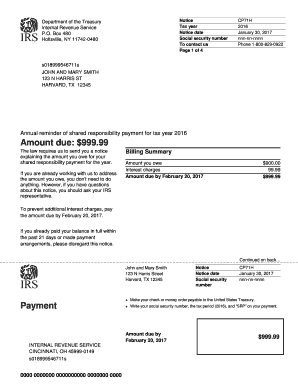
Get Holtsville, Ny 11742-0480
This website is not affiliated with IRS
How it works
-

Open form follow the instructions
-

Easily sign the form with your finger
-

Send filled & signed form or save
How to fill out the Holtsville, NY 11742-0480 online
This guide provides a comprehensive overview of how to complete the Holtsville, NY 11742-0480 form online. Following these steps will ensure that you accurately fill out the required information while navigating any complexities that may arise.
Follow the steps to accurately complete the form online.
- Press the ‘Get Form’ button to obtain the document and open it for editing.
- Fill in your tax year, which in this case is 2016. Make sure to enter the correct year as specified in the notice.
- Input the notice date, which is January 30, 2017, ensuring accuracy in this detail.
- Enter your social security number as indicated in the designated section. This identification number is crucial for processing your information.
- Review the amount due section and verify the total payment listed, which is $999.99.
- If applicable, include the billing summary details, listing the amount owed and any interest charges.
- Follow the instructions for payment, detailing how to make the payment either online or via check.
- End by saving your changes and selecting your preferred option to download, print, or share the completed form.
Complete your forms online today to ensure timely processing and avoid any penalties.
What is the notice telling me? This notice is your Notice of Intent to Levy as required by Internal Revenue Code Section 6331 (d). It is your final reminder telling you that we intend to levy your wages, bank accounts, or your state tax refund because you still have an unpaid balance on one of your tax accounts.