Loading
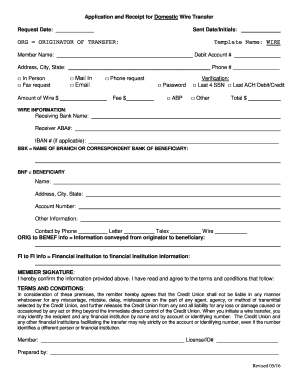
Get Application And Receipt For Domestic Wire Transfer
How it works
-

Open form follow the instructions
-

Easily sign the form with your finger
-

Send filled & signed form or save
How to fill out the Application And Receipt For Domestic Wire Transfer online
Filling out the Application And Receipt For Domestic Wire Transfer online can streamline your funds transfer process. This guide will provide you with clear, step-by-step instructions to ensure that you complete the form accurately and efficiently.
Follow the steps to successfully complete the application.
- Click ‘Get Form’ button to access the Application And Receipt For Domestic Wire Transfer and open the document for editing.
- Enter the request date in the designated space at the top of the form. This indicates when you are submitting the wire transfer request.
- Fill in your name as the originator of the transfer under the 'ORG' section. This is crucial for identifying who is sending the funds.
- Provide your address, including city and state. This information may be used for verification purposes.
- Indicate your preferred method of request by checking one of the options: In Person, Fax request, Mail In, Email, or Phone request.
- Input your debit account number, which is the account from which the wire transfer funds will be withdrawn.
- Clearly state the amount of the wire transfer in the designated field, ensuring that it is accurate.
- Enter your phone number, providing a way for the bank to contact you if needed.
- Select one of the verification options available, like entering a password, noting your last four social security numbers, or other verification methods.
- In the 'WIRE INFORMATION' section, input the receiving bank's name and ABA number, which is essential for routing the funds correctly.
- If applicable, provide the IBAN number, which may be required for international transfers.
- Complete the beneficiary's name, address, and account number in the 'BNF' section to ensure the recipient is properly identified.
- Select the preferred method of contact for the beneficiary: Phone, Letter, Telex, or Wire.
- Fill out any additional information needed for transmission in both the 'ORIG to BENEF info' and 'FI to FI info' sections.
- To affirm the accuracy of the information provided, affix your signature as the member and indicate your license or ID number.
- Review all information to ensure correctness. Once completed, you can save your changes, download the form, print it, or share it as necessary.
Begin your wire transfer process by completing the Application And Receipt For Domestic Wire Transfer online today.
Get form
Experience a faster way to fill out and sign forms on the web. Access the most extensive library of templates available.
If transactions involve more than $10,000, you are responsible for reporting the transfers to the Internal Revenue Service (IRS). Failing to do so could lead to fines and other legal repercussions.
Get This Form Now!
Use professional pre-built templates to fill in and sign documents online faster. Get access to thousands of forms.