Help using this PDF claim form You can save data typed into this PDF form if you use Adobe Reader XI or a newer version. This means that you do not have to fill the form in one session. This form.
Loading

Open form follow the instructions

Easily sign the form with your finger

Send filled & signed form or save
How to fill out the UK CRMR1 online
The UK CRMR1 form is essential for users who wish to request a Mandatory Reconsideration of a decision made by the Department for Work and Pensions. This guide provides clear, step-by-step instructions to help you complete the form accurately and efficiently.
Follow the steps to fill out the UK CRMR1 form online
- Press the ‘Get Form’ button to access the form and open it in the appropriate editor.
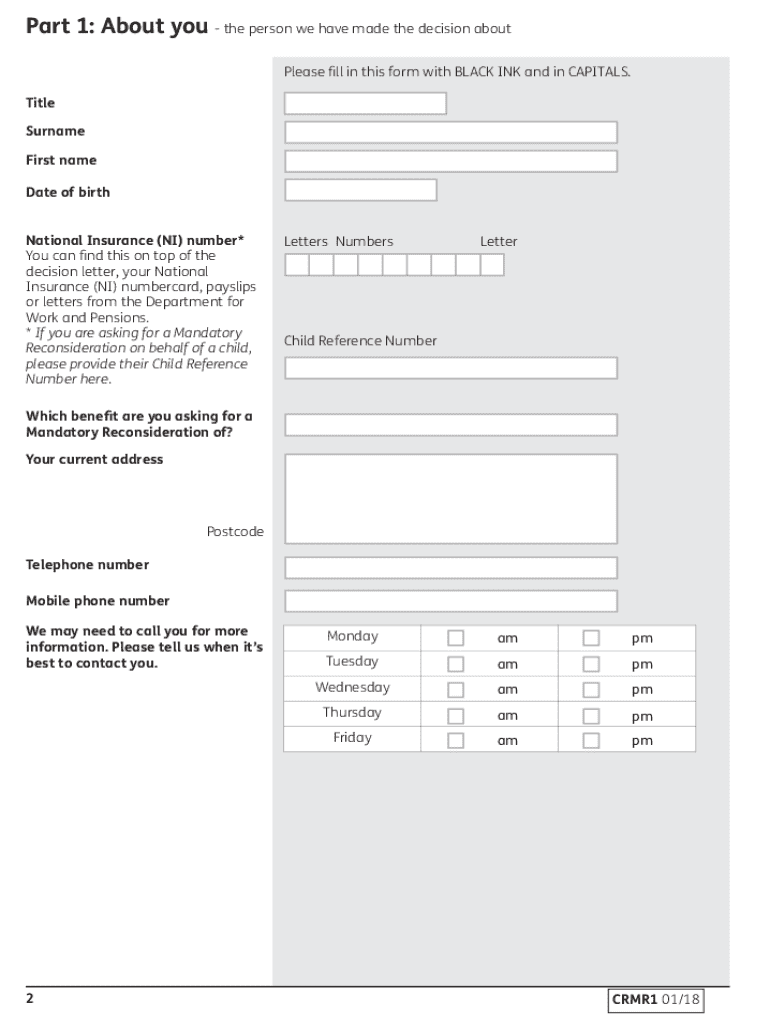
- Begin completing Part 1, which requires details about you, the person the decision pertains to. Fill in your title, surname, first name, date of birth, and National Insurance number. Remember, if you are submitting this for a child, use their Child Reference Number instead.
- Next, indicate which benefit you are asking for a Mandatory Reconsideration of and provide your current address, postcode, and telephone numbers. It's helpful to specify your preferred contact times for follow-up calls.
- If you are a representative completing the form for another person, fill out Part 2 with your details, including your relationship to the person and your contact number.
- In Part 3, confirm whether you are requesting the review within one month of your decision letter and provide an explanation if it’s beyond this timeframe.
- Part 4 requires you to explain in detail why you disagree with the decision, specifying each aspect you contest, as well as any new information relevant to your claim.
- Ensure all required evidence is attached as indicated in Part 4, and clarify any reasons if you are unable to provide certain additional information.
- Conclude by reviewing Part 5, ensuring all sections are completed correctly, and sign the form. If signing on behalf of someone else, include signed authority unless you are already recognized as their appointee.
- After completing the form, print it, sign it, and post it along with any additional evidence requested to the address indicated at the top of your decision letter.
Start filling out your UK CRMR1 form online today to ensure your reconsideration request is submitted promptly.
Experience a faster way to fill out and sign forms on the web. Access the most extensive library of templates available.
Related content
by M Huckert · 2015 · Cited by 56 — Mutations in the latent TGF-beta binding protein 3...
Dissertation presented as partial requirement for obtaining the Master's degree in...
Get answers to your most pressing questions about US Legal Forms API.
How do I get a CRMR1 form?
You can obtain the CRMR1 form by visiting the UK government’s official website or by contacting your local Jobcentre. Ensure you specify that you need the CRMR1 form for mandatory reconsideration. Having this form helps streamline your process and ensures you provide the necessary information. Remember, completing the UK CRMR1 form thoroughly can greatly assist your application.
How do I declare Universal Credit?
To declare Universal Credit, you should complete your online application on the UK government's official website. Ensure you have your income details, savings, and other relevant information ready to provide an accurate declaration. Once submitted, you must keep your information updated regularly. For added clarity, consider utilizing the UK CRMR1 form for clear communications regarding your benefits.
How do I get a proof of Universal Credit letter UK?
To obtain a proof of Universal Credit letter in the UK, log in to your online Universal Credit account and request the necessary documentation. Alternatively, you can ask for it directly from your local Jobcentre Plus or through a written request to the relevant department. This letter is crucial for verifying your benefits, making the UK CRMR1 form an effective tool in your application process.
How to get proof of benefits letter NI?
You can get proof of your benefits letter from Northern Ireland by contacting the Benefits Office that administers your payments. They can provide you with a written statement detailing your benefit status. It’s helpful to have your National Insurance number ready for quicker processing. Additionally, ensure you reference the UK CRMR1 to reinforce your proof of benefits request.
How do I get a benefit letter from Social Security?
To obtain a benefit letter from Social Security, you can request it by visiting your local Social Security office or applying online through their official website. Provide your personal details and specify the type of letter you need. This letter can serve as essential proof for various purposes. If you're dealing with Universal Credit, complementing this process with the UK CRMR1 form can help clarify your benefits.
What are the chances of winning a mandatory reconsideration?
The chances of winning a mandatory reconsideration can vary based on individual circumstances and the evidence provided. Many applicants find that having clear documentation and articulating their reasons effectively increases their chances. Therefore, it's essential to prepare a robust case. Using resources like the UK CRMR1 can guide you in gathering relevant information for a stronger appeal.
What is the best way to ask for a mandatory reconsideration?
When requesting a mandatory reconsideration, it is best to write a clear and concise letter to the Department for Work and Pensions. Make sure to include your personal information, the decision you wish to challenge, and any supporting evidence or documents. Be specific about why you believe the decision is incorrect. Using the UK CRMR1 can assist in accurately presenting your case.
How to show Universal Credit proof?
To show proof of Universal Credit, you can provide documents such as your Universal Credit statement or a benefit award letter. These documents confirm your eligibility and status. You can obtain these from your online Universal Credit account or request them through the Social Security office. Utilizing the UK CRMR1 form can help clarify your benefits, making your proof submission easier.
Who looks at a mandatory reconsideration?
A mandatory reconsideration is reviewed by a trained officer from the relevant benefits authority. They will assess your case objectively, considering the evidence provided in your CRMR1. This officer's responsibility is to determine whether the original decision aligns with regulations and guidelines. Ensuring that all documentation is clear and concise can greatly influence the review process.
How long does a mandatory reconsideration payment take?
The duration for processing a mandatory reconsideration payment can differ, but it typically takes several weeks to months. After submitting your CRMR1, you should receive acknowledgment of your request, followed by a decision phase. If you receive a positive outcome, the payment may be backdated to when you first submitted your claim. Staying updated with the process using tools from US Legal Forms can keep you informed.
Use professional pre-built templates to fill in and sign documents online faster. Get access to thousands of forms.
If you believe that this page should be taken down, please follow our DMCA take down process here.