Loading
Get Tirebatteryfee Dor Mo Gov
How it works
-

Open form follow the instructions
-

Easily sign the form with your finger
-

Send filled & signed form or save
How to fill out the Tirebatteryfee Dor Mo Gov online
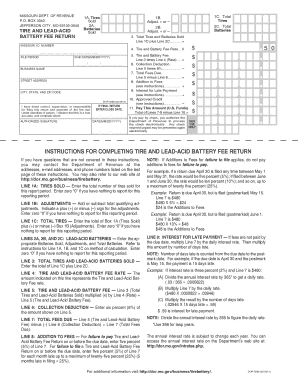
Filling out the Tire and Lead-Acid Battery Fee Return form is essential for compliance with state regulations. This guide provides step-by-step instructions to ensure you complete the form accurately and efficiently.
Follow the steps to complete the Tire and Lead-Acid Battery Fee Return.
- Press the ‘Get Form’ button to download the Tire and Lead-Acid Battery Fee Return form. Open the document in your chosen editor to begin filling it out.
- Enter the Missouri ID number. This is a unique identifier assigned to your business by the Department of Revenue.
- Indicate the total number of tires sold during the reporting period in Line 1A. If you had no sales, enter zero ‘0’.
- For any adjustments related to tires, complete Line 1B by adding or subtracting the necessary amount, ensuring to denote with a plus (+) or minus (–) sign.
- Calculate the total tires for the reporting period in Line 1C by adding Line 1A and Line 1B. Again, enter zero ‘0’ if applicable.
- Complete Lines 2A, 2B, and 2C for lead-acid batteries sold, adjustments, and total batteries sold as you did for tires.
- In Line 3, compute the total tires and lead-acid batteries sold by adding Line 1C and Line 2C.
- Identify the fee rate in Line 4 as indicated by the Department of Revenue.
- Calculate the Tire and Lead-Acid Battery Fee in Line 5 by multiplying Line 3 by Line 4.
- Complete Line 6 by calculating the collection deduction, which is six percent (6%) of the amount shown in Line 5.
- Calculate the total fees due in Line 7 by subtracting Line 6 from Line 5.
- Refer to the provided instructions to determine if there are any additions to fees (Line 8) or interest for late payment (Line 9) to include.
- Record any approved credits in Line 10, if applicable.
- In Line 11, sum all calculated amounts to determine the amount due. Make payment arrangements as indicated.
- Sign and date the return. If this is your final return, be sure to enter the close date.
- Review all information for accuracy, then save, download, print, or share the completed form as needed.
Complete your Tire and Lead-Acid Battery Fee Return form online to ensure compliance with Missouri tax regulations.
The core charge is included in the Applicant's gross receipts and is subject to sales tax. If the core charge is refunded to the customer, Applicant should refund the sales tax on the amount returned to the customer. Applicant's gross receipts are reduced by the amount of the core charge refunded to the customer.