Loading
Get 4525 Form
How it works
-

Open form follow the instructions
-

Easily sign the form with your finger
-

Send filled & signed form or save
How to fill out the 4525 Form online
Filling out the 4525 Form online can streamline your enrollment process for health benefits. This guide offers clear, step-by-step instructions to help you navigate each section of the form effectively.
Follow the steps to complete the 4525 Form online.
- Click the 'Get Form' button to access the form and open it for editing.
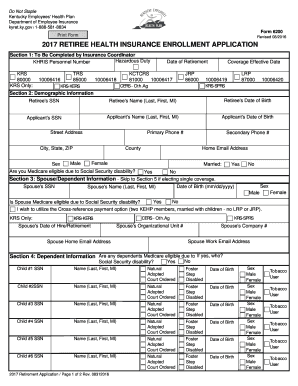
- Section 1 requires completion by the insurance coordinator. Here, you will provide key details such as your retirement date and personnel number. Ensure all information is accurate.
- In Section 2, fill in your demographic information. Include fields such as your Social Security number, name, date of birth, and contact details. Verify that each entry is correct.
- If you have a spouse or dependents, proceed to Section 3. Here, you will provide information about your spouse and any children. Include their Social Security numbers, names, dates of birth, and whether they are Medicare eligible.
- In Section 4, provide details on any dependents, if applicable. For each child, indicate their Social Security number and select their relationship type, ensuring to include their date of birth.
- Section 5 pertains to tobacco use. Answer the questions about tobacco usage for yourself, your spouse, and dependents aged 18 or older. This is important for premium contributions.
- In Section 6, select your coverage level—options include single, couple, parent plus, and family. Ensure your choice reflects your current situation.
- Section 7 allows you to choose your plan options. Review the options and select the one that best suits your needs.
- Section 8 requires you to agree to the LivingWell Promise if selecting a LivingWell plan. Read the terms and confirm your agreement.
- Finally, Section 9 is where you provide signatures. By typing your name in the designated space, you are electronically signing the application. Ensure all required signatures are completed.
- After completing the form, review all sections for accuracy. You can then save changes, download, print, or share the form as necessary.
Start completing your 4525 Form online today to ensure prompt enrollment in your health plan.
If you are interested in taking a refund you should contact KPPA for more information, or to obtain a Form 4525, Application for Refund of Member Contributions. You may also call us at 502-696-8800 or Toll-Free at 800-928-4646, or complete the request below to obtain a form via mail.