Loading
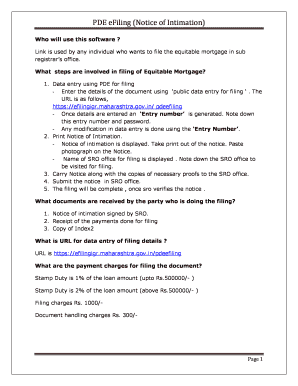
Get Pde Filing
How it works
-

Open form follow the instructions
-

Easily sign the form with your finger
-

Send filled & signed form or save
How to fill out the PDE Filing online
Filling out the PDE Filing online is an essential step for individuals seeking to file an equitable mortgage. This guide will provide you with clear, detailed instructions to navigate each section of the form efficiently.
Follow the steps to complete your PDE Filing online.
- Press the ‘Get Form’ button to retrieve the PDE Filing form and open it for completion.
- Begin by entering your username and password in the designated fields. After entering the credentials, press the 'Start Data Entry' button to initiate the process for a new entry.
- For modifications to an existing entry, input the 13-digit code, along with your password, and press the 'Start Edit Entry' button.
- Input the date of the mortgage and then select the 'Start Filing Entry' button to proceed.
- Enter the mortgagee details, which include information about the bank or non-financial bank company, and click the 'Save' button.
- Next, input the mortgagor details, which represent the party borrowing the money. Again, select the 'Save' button once this information is complete.
- If there are multiple mortgagors, you can add additional parties by clicking the 'Add Another Party' button.
- Proceed to enter the property details and click 'Save' to record this information.
- Input the payment details, including the filing fee. Use the designated button to enter all required information and save it.
- Click 'Add' if you need to include another entry for payment details.
- Enter the stamp duty details by clicking on the 'Stamp Duty' button, then fill in the necessary information and press the 'Save' button.
- View the Notice of Intimation by selecting the 'View Notice' option.
- Carefully review all the details displayed in the draft and click the 'Submit Data' button to complete your submission.
- Once submitted, a PDF will be generated. Print this PDF, sign it, and prepare to submit it to the sub-registrar.
- Finally, take a printout of the generated PDF and consult the following window, which displays the list of the SRO offices for filing.
Complete your PDE Filing online today to efficiently manage your equitable mortgage process.
Call: 1-717- 787-5500 or send an e-mail to: ra-edmisconductlep@pa.gov. Atención: Si usted habla un idioma que no sea el inglés, los servicios de asistencia lingüística, de forma gratuita, están disponibles para usted.
Industry-leading security and compliance
US Legal Forms protects your data by complying with industry-specific security standards.
-
In businnes since 199725+ years providing professional legal documents.
-
Accredited businessGuarantees that a business meets BBB accreditation standards in the US and Canada.
-
Secured by BraintreeValidated Level 1 PCI DSS compliant payment gateway that accepts most major credit and debit card brands from across the globe.