Loading
Form preview
  • US Legal Forms
  • Other Templates
  • Foreign Forms
  • Foreign India Other Forms
  • India Annexure S2

Get India Annexure S2

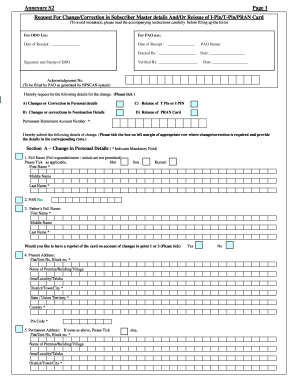
–Request for Reissue of I-PIN/T-PIN I hereby, request you to reissue the following T-PIN I-PIN Section D –Request for Reissue of PRAN card. I hereby request for reissue of PRAN card on account of Loss of PRAN card Damage to old card I _____________________________________________________________ , the applicant, do hereby declare that what is stated above is true to the best of my information & belief. Date : D D M M Y Y Y Y Signature/Left Thumb Impression of Subscriber INSTRUCT.

How it works

  1. Open form

    Open form follow the instructions

  2. Easily sign form

    Easily sign the form with your finger

  3. Share form

    Send filled & signed form or save

How to fill out the India Annexure S2 online

This guide provides a comprehensive overview for users looking to complete the India Annexure S2 form online. By following the steps outlined, you can ensure that your changes or requests regarding personal details or PRAN card issues are efficiently processed.

Follow the steps to accurately fill out the form online.

  1. Click ‘Get Form’ button to access the Annexure S2 form and open it in the designated editor.
  2. Begin by entering your Permanent Retirement Account Number (PRAN) at the top of the form. This is essential for identifying your account.
  3. Select the reason for your request by ticking the appropriate box: changes in personal details, changes in nomination details, reissue of T-PIN or I-PIN, or reissue of the PRAN card.
  4. Fill in your personal details in Section A. Make sure to provide your full name, PAN number, father’s full name, and your current and permanent addresses. Always tick the box for the same address if applicable.
  5. Enter your contact information including your phone number, mobile number, and email ID. This information is crucial for communication regarding your request.
  6. Complete your bank details, including your bank account number, bank name, bank branch, and bank’s MICR code.
  7. Proceed to Section B to fill out the nomination details. You can nominate up to three individuals, providing their names, dates of birth (if minors), relationships with you, and percentage shares.
  8. In Section C, indicate if you are requesting a reissue of your T-PIN or I-PIN by ticking the appropriate box.
  9. In Section D, request the reissue of your PRAN card if necessary, selecting the reason for reissue.
  10. Review all entered information for accuracy. Ensure all mandatory fields marked with an asterisk are completed.
  11. Once completed, save your changes, download the filled form, print it if needed, or share it as required.

Complete your India Annexure S2 form online to ensure swift processing of your request.

Get form

Experience a faster way to fill out and sign forms on the web. Access the most extensive library of templates available.
Get form

Related content

1 Malaria Elimination Demonstration Project, ...
by H Rajvanshi · 2021 · Cited by 22 — In the year 2018, this number rose to 95%, and...
Learn more
annexure s2 form | Latest: Registration of...
Form -ISS (Ver 1.2) Page 3 FOR THE I. If the application form is in order, CRA shall...
Learn more

Related links form

VICS BOL Supplement to the Bill of Lading EPA 6100-2 2015 EPA 7520-16 2011 EPA Form 8700-12 8700-13 A/B 8700-23

Questions & Answers

Get answers to your most pressing questions about US Legal Forms API.

Contact support

To submit an S2 form online, log into your account on the official NPS portal. Locate the S2 form option, fill in the required details, and follow the verification steps to complete the submission. If you're unsure, consulting resources on the India Annexure S2 can provide useful insights.

Filling out an NPS form requires careful attention to detail. Gather your personal details and investment preferences, then complete the form systematically. If you're submitting the India Annexure S2, include this in your submission to further facilitate your NPS completion.

You can submit your NPS withdrawal form at any designated Point of Presence (POP) or through the NPS online portal. Ensure that all required fields are filled out and documents attached. If your withdrawal pertains to the India Annexure S2, make sure to mention this to expedite the process.

Annexure S2 is a specified document required to facilitate the processing of NPS transactions. It contains important information related to your investment choices and beneficiary details. Understanding the role of the India Annexure S2 is crucial for ensuring that your NPS submissions are accurate and complete.

To change your bank account details in NPS online, log into your NPS account and navigate to the 'Modify' section. Here, you can update your banking information securely. If you're dealing with the India Annexure S2, ensure that the new account details align with the requirements outlined in the form.

Filling up the NPS S2 form involves entering your personal details and selecting the appropriate options for your investment choices. Take your time to review each section to avoid mistakes. For clarity on how the India Annexure S2 fits into your overall NPS submission, check the instructions provided alongside the form.

To log in to your NPS account, visit the official NPS website and click on the login option. Enter your user ID and password, then click on 'Login'. If you need further assistance with your account or integrating the India Annexure S2, refer to the guidance provided on the site.

To submit an NPS form, you need to fill out the necessary details on the form, including your personal information and financial data. Once completed, you can submit it through the relevant NPS portal or via a Point of Presence (POP). If you're working with the India Annexure S2, make sure to follow the submission guidelines carefully to ensure a smooth process.

To correct your NPS details, first identify the inaccuracies present in your account information. You will need to complete the NPS correction form, often accompanied by the India Annexure S2 for specific changes. Submit this form through your NPS provider's online platform or in person to ensure updates are processed effectively.

To request subscriber shifting in NPS, complete the relevant form that accompanies your India Annexure S2. Make sure to provide accurate details about your existing and new accounts. Once completed, submit it to your current NPS provider or on the official portal to process your request seamlessly.

Get This Form Now!

Use professional pre-built templates to fill in and sign documents online faster. Get access to thousands of forms.
Get form
If you believe that this page should be taken down, please follow our DMCA take down processhere.
Get India Annexure S2
Get form
  • Adoption
  • Bankruptcy
  • Contractors
  • Divorce
  • Home Sales
  • Employment
  • Identity Theft
  • Incorporation
  • Landlord Tenant
  • Living Trust
  • Name Change
  • Personal Planning
  • Small Business
  • Wills & Estates
  • Packages A-Z
  • Affidavits
  • Bankruptcy
  • Bill of Sale
  • Corporate - LLC
  • Divorce
  • Employment
  • Identity Theft
  • Internet Technology
  • Landlord Tenant
  • Living Wills
  • Name Change
  • Power of Attorney
  • Real Estate
  • Small Estates
  • Wills
  • All Forms
  • Forms A-Z
  • Other Templates
  • Legal Hub
  • About Us
  • Help Portal
  • Legal Resources
  • Blog
  • Affiliates
  • Contact Us
  • Delete My Account
  • Site Map
  • Industries
  • Forms in Spanish
  • Localized Forms
  • State-specific Forms
  • Forms Kit
  • Real Estate Handbook
  • All Guides
  • Notarize
  • Incorporation services
  • For Consumers
  • For Small Business
  • For Attorneys
  • USLegal
  • FormsPass
  • pdfFiller
  • signNow
  • altaFlow
  • DocHub
  • Instapage
Form Packages
  • Adoption
  • Bankruptcy
  • Contractors
  • Divorce
  • Home Sales
  • Employment
  • Identity Theft
  • Incorporation
  • Landlord Tenant
  • Living Trust
  • Name Change
  • Personal Planning
  • Small Business
  • Wills & Estates
  • Packages A-Z
Form Categories
  • Affidavits
  • Bankruptcy
  • Bill of Sale
  • Corporate - LLC
  • Divorce
  • Employment
  • Identity Theft
  • Internet Technology
  • Landlord Tenant
  • Living Wills
  • Name Change
  • Power of Attorney
  • Real Estate
  • Small Estates
  • Wills
  • All Forms
  • Forms A-Z
  • Other Templates
Customer Service
  • Legal Hub
  • About Us
  • Help Portal
  • Legal Resources
  • Blog
  • Affiliates
  • Contact Us
  • Delete My Account
  • Site Map
  • Industries
  • Forms in Spanish
  • Localized Forms
  • State-specific Forms
  • Forms Kit
Legal Guides
  • Real Estate Handbook
  • All Guides
Prepared for you
  • Notarize
  • Incorporation services
Our Customers
  • For Consumers
  • For Small Business
  • For Attorneys
Our Sites
  • USLegal
  • FormsPass
  • pdfFiller
  • signNow
  • altaFlow
  • DocHub
  • Instapage
Social Media
Call us now toll free:
+1 833 426 79 33
As seen in:
© Copyright 1999-2026 airSlate Legal Forms, Inc. 17 Station Street, Suite 303, Brookline, MA 02445
  • Your Privacy Choices
  • Terms of Service
  • Privacy Notice
  • Content Takedown Policy
  • Bug Bounty Program