Loading
Get Trade Payment Wizard$(tm)
How it works
-

Open form follow the instructions
-

Easily sign the form with your finger
-

Send filled & signed form or save
How to fill out the Trade Payment Wizard$(tm) online
Filling out the Trade Payment Wizard$(tm) online is a straightforward process that ensures your international documentary collections are handled efficiently. This guide provides clear instructions to help you navigate each section of the form with ease.
Follow the steps to complete the Trade Payment Wizard$(tm) online.
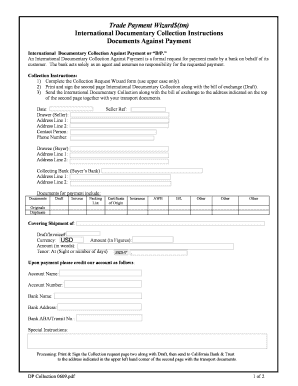
- Click the ‘Get Form’ button to access the Trade Payment Wizard$(tm) online and open the form for editing.
- Begin by filling out the date section. Enter the current date in the appropriate field, ensuring it is formatted correctly.
- In the 'Drawer (Seller)' section, provide the seller's name, followed by their address in the designated address lines. Be sure to include contact details of a designated person and their phone number.
- Complete the 'Drawee (Buyer)' section next, filling out the buyer's name and address as specified.
- In the 'Collecting Bank (Buyer’s Bank)' section, input the name and address of the buyer's bank.
- List the documents required for payment in the designated area. Check off the applicable documents such as the draft, invoice, packing list, and any other relevant paperwork.
- Fill out the details regarding the payment: draft/invoice number, currency (USD), amount in figures and words, and the tenor as either 'At Sight' or a specified number of days.
- Specify the account details where payment should be credited, including account name, number, bank name, address, and ABA/transit number.
- If there are any special instructions, include them in the space provided.
- After completing the form, print and sign the second page of the International Documentary Collection along with the bill of exchange.
- Finally, submit the completed documents to the address indicated at the top of the second page, along with any transport documents. You can then save your changes, download a copy, print the form, or share it as needed.
Complete your Trade Payment Wizard$(tm) online today to streamline your international transactions!
Trade payment implies a payment made under an agreement of protection by a safety insurer to a third-party provider to replace or fix the guaranteed merchandise that was lost, harmed, or obliterated.