Loading
Get Csi Form 01-5c - Substitution Request.docx
How it works
-

Open form follow the instructions
-

Easily sign the form with your finger
-

Send filled & signed form or save
How to fill out the CSI Form 01-5C - Substitution Request.docx online
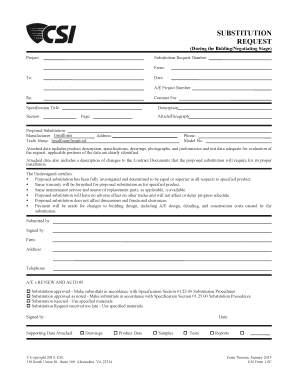
Filling out the CSI Form 01-5C - Substitution Request online is essential for submitting requests for product substitutions during the bidding or negotiating stage of a project. This guide will walk you through each component of the form, ensuring a comprehensive and user-friendly experience.
Follow the steps to complete the form accurately.
- Click ‘Get Form’ button to access the form in a suitable online editor.
- Fill in the project name at the top of the form.
- Enter the substitution request number and the date of submission.
- Provide your name and contact information in the 'From' section.
- Specify the 'To' section with the recipient's details.
- Record the Architectural/Engineering (A/E) project number.
- Indicate the contract for which this substitution is being requested.
- Fill in the specification title and corresponding section.
- Describe the proposed substitution, including the manufacturer and trade name.
- List the article or paragraph relevant to the substitution request.
- Include your address and phone number for correspondence.
- Attach any necessary supporting data, such as product descriptions and specifications, to substantiate your request.
- Certify the proposal's adequacy by confirming it matches or exceeds the specified product's standards, offers the same warranty, and will not negatively impact the project.
- Indicate who is submitting the request, complete the signature section, and provide your firm’s name and address.
- Ensure the A/E's review and action section is clear, indicating whether the substitution is approved or rejected.
- Save your changes, download, print, or share the form as necessary.
Start filling out the CSI Form 01-5C - Substitution Request online today!