Loading
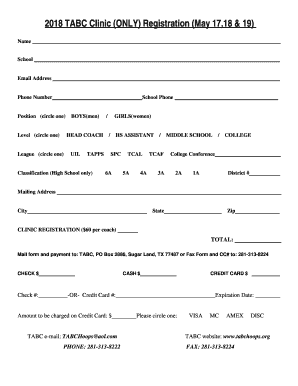
Get 2018 Tabc Clinic (only) Registration (may 17,18 & 19)
How it works
-

Open form follow the instructions
-

Easily sign the form with your finger
-

Send filled & signed form or save
How to fill out the 2018 TABC Clinic (ONLY) Registration (May 17,18 & 19) online
Filling out the 2018 TABC Clinic registration form online is a straightforward process. This guide will walk you through each section of the form, ensuring you provide all required information accurately and efficiently.
Follow the steps to complete your registration seamlessly.
- Click the ‘Get Form’ button to obtain the 2018 TABC Clinic registration form and open it in your designated editing platform.
- Begin by entering your name as you would like it to appear on your registration.
- Next, provide the name of your school in the designated field.
- Enter your email address, ensuring it is an active account for future correspondence.
- Fill in your phone number for contact purposes.
- Include your school's phone number for verification.
- In the ‘Position’ section, circle your current role; options include 'Head Coach', 'HS Assistant', or 'others'.
- Circle your appropriate coaching level: 'Boys', 'Girls', 'Middle School', or 'College'.
- If you are registering for High School competitions, indicate the classification level by circling '6A', '5A', '4A', '3A', '2A', or '1A'.
- If applicable, specify your college conference.
- Enter your district number in the provided field.
- Fill in your mailing address, including the city, state, and zip code.
- For clinic registration, note the fee of $60 per coach; specify the total amount.
- Choose your payment method by circling 'Check', 'Cash', or 'Credit Card' and complete the required information.
- For credit card payments, provide the card number, expiration date, and total amount to be charged.
- Once all fields are completed, save your changes, and proceed to download, print, or share the form as needed.
Get started on your online registration today!
Industry-leading security and compliance
US Legal Forms protects your data by complying with industry-specific security standards.
-
In businnes since 199725+ years providing professional legal documents.
-
Accredited businessGuarantees that a business meets BBB accreditation standards in the US and Canada.
-
Secured by BraintreeValidated Level 1 PCI DSS compliant payment gateway that accepts most major credit and debit card brands from across the globe.