Loading
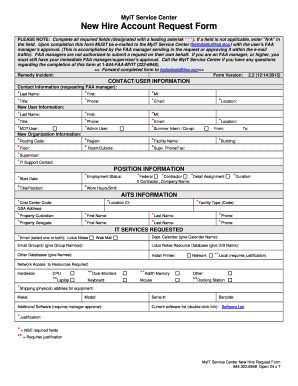
Get Myit-new-hire-account-form.rtf
How it works
-

Open form follow the instructions
-

Easily sign the form with your finger
-

Send filled & signed form or save
How to fill out the MyIT-New-Hire-Account-Form.rtf online
This guide provides clear, step-by-step instructions for completing the MyIT-New-Hire-Account-Form.rtf online. By following these steps, users can ensure that all necessary information is correctly provided to facilitate a smooth submission process.
Follow the steps to accurately complete the form.
- Click the ‘Get Form’ button to download and access the form for editing.
- Fill in the CONTACT/USER INFORMATION section with the required details about the requesting FAA manager and the new user, including last name, first name, title, phone number, and email.
- Complete the New Organization Information section by providing the routing code, facility name, location, and IT support contact details.
- In the POSITION INFORMATION section, indicate the employment status and provide the official title, work hours, and shift of the new user.
- Enter details in the AITS INFORMATION section, including cost center code, location ID, and property custodian information.
- Request IT services by checking the appropriate boxes under the IT SERVICES REQUESTED section for items like email setup, printer installation, and required hardware.
- Ensure all required fields, marked with an asterisk '*', are filled out accurately. If a field does not apply, enter 'N/A'.
- Once all sections are completed, save your changes, and prepare to submit the form by downloading or printing it.
- Submit the completed form via email to the MyIT Service Center at helpdesk@faa.gov, ensuring that the necessary approvals are included.
Complete your documents online today to streamline your new hire account setup.
Industry-leading security and compliance
US Legal Forms protects your data by complying with industry-specific security standards.
-
In businnes since 199725+ years providing professional legal documents.
-
Accredited businessGuarantees that a business meets BBB accreditation standards in the US and Canada.
-
Secured by BraintreeValidated Level 1 PCI DSS compliant payment gateway that accepts most major credit and debit card brands from across the globe.