Loading
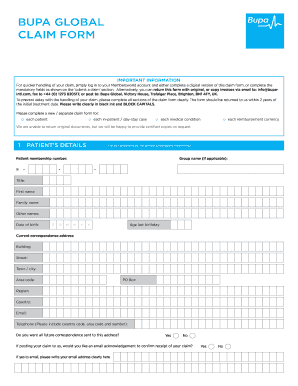
Get Bupa Claim
How it works
-

Open form follow the instructions
-

Easily sign the form with your finger
-

Send filled & signed form or save
How to fill out the Bupa Claim online
Filing a Bupa Claim online is a straightforward process that helps you request reimbursement for medical expenses. This guide outlines each step to ensure you complete the claim form accurately and efficiently.
Follow the steps to successfully submit your Bupa Claim online.
- Click 'Get Form' button to obtain the Bupa Claim form and open it in your preferred editor.
- Begin with 'Patient’s Details.' Fill in your membership number, group name if applicable, and personal information such as name, date of birth, age, address, email, and phone number. Ensure all details are clear and complete.
- Under 'Claim/Medical Details,' provide the medical practitioner’s information including their signature, and the country where treatment occurred. Indicate the currency of the invoice and total claim amount.
- In the 'Cash Benefit' section, if applicable, include the details from the hospital or medical provider, including their qualifications and contact information. Confirm the treatment dates.
- Proceed to 'Payment Details.' Fill in details about when symptoms first appeared and when you first visited a medical professional. Specify your preferred payment recipient.
- Complete the 'Consent' section by agreeing to the terms regarding medical reports necessary for the processing of your claim.
- Review your entries for accuracy and completeness. If you're excepting any medical reports, confirm your preferences regarding viewing those reports before they are sent.
- After verifying all information, you have the option to save changes, download, print, or share the form as needed.
Complete your documents online for a seamless claim process.
Download the app now For unlimited, 24/7 appointments with our healthcare professionals, download the Babylon app now from the App Store or Google Play and enter your Digital GP membership code when registering (you can find this in your Bupa documents). If you're a direct Bupa customer, your code is BUPAVGP.