Loading
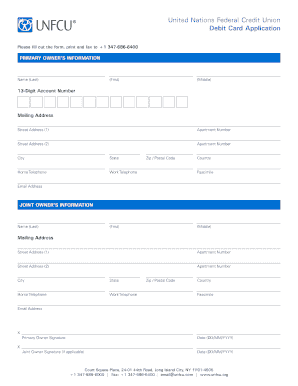
Get Unfcu Account Number 13 Digits
How it works
-

Open form follow the instructions
-

Easily sign the form with your finger
-

Send filled & signed form or save
How to fill out the Unfcu Account Number 13 Digits online
Filling out the Unfcu Account Number requires attention to detail to ensure accuracy. This guide provides clear, step-by-step instructions to assist you in completing the form efficiently and correctly.
Follow the steps to fill out the Unfcu Account Number form online.
- Select the ‘Get Form’ button to access the form and open it for filling out.
- Begin with the primary owner's information section. Enter the last name, first name, and middle name in the designated fields.
- Locate the field labeled '13-Digit Account Number.' Input your 13-digit account number accurately, ensuring there are no missing or extra digits.
- Proceed to the mailing address section. Fill in Street Address 1 and, if applicable, include Street Address 2 along with the apartment number.
- Complete the city, state, zip/postal code, and country fields with the relevant information.
- Provide your home telephone number, work telephone number, facsimile number, and email address in their respective fields.
- If there is a joint owner, repeat the information process for the joint owner’s details, ensuring you fill in their name, address, contact numbers, and email.
- Proceed to sign the form. The primary owner should sign and date the form in the designated area, and if applicable, the joint owner should also sign and date.
- After completing all sections, save your changes. You may also choose to download, print, or share the form as needed.
Complete your Unfcu Account application online today!
Your savings and checking account numbers are usually 13-digit numbers, respectively: 10 + [UNFCU membership number] + 0001. 10 + [UNFCU membership number] + 0002.