Loading
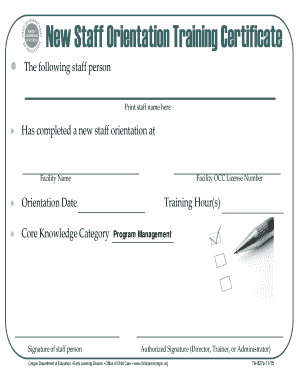
Get New Staff Orientation - Oregon Early Learning Division
How it works
-

Open form follow the instructions
-

Easily sign the form with your finger
-

Send filled & signed form or save
How to fill out the New Staff Orientation - Oregon Early Learning Division online
Filling out the New Staff Orientation form is an essential step for new staff members in the Oregon Early Learning Division. This guide provides a clear and supportive framework to help users navigate the online form effectively and ensure all necessary information is accurately recorded.
Follow the steps to complete the form easily and accurately.
- Press the ‘Get Form’ button to access the New Staff Orientation form. This action will allow you to retrieve the document and open it in an editable format.
- Begin by entering the name of the staff member who has completed the orientation in the designated field labeled 'Print staff name here.' This section is crucial for identifying the individual associated with the training.
- Next, provide the Facility OCC License Number. This number serves as a unique identifier for the facility and is important for record keeping.
- In the 'Facility Name' field, write the formal name of the facility where the orientation took place. This further specifies the context of the training.
- Input the date of the orientation in the 'Orientation Date' section. It is important to accurately reflect the actual date the training was completed.
- For the 'Core Knowledge Category,' indicate the relevant category that corresponds to the training completed. This categorization helps in understanding the training focus.
- Have the staff member sign in the 'Signature of staff person' area to validate their attendance and completion of the orientation.
- Specify the number of training hours completed by the staff member in the 'Training Hour(s)' section. This quantifies the duration of training undertaken.
- An authorized individual, such as a director, trainer, or administrator, must then sign in the 'Authorized Signature' field to formally approve the completion of the training.
- Once all fields have been completed accurately, you can save your changes, download a copy of the form, print it, or share it as required.
Complete your documentation by filling out the New Staff Orientation form online today!
How to design an effective orientation program Welcome the employee. From the time the new employee walks in the door, the focus should be on easing their anxiety. ... Provide the employee handbook. ... Go over policies. ... Thoroughly explain the details of the job. ... Set goals and action steps. ... Clearly define overarching expectations.