Loading
Get Masjid E Quba
How it works
-

Open form follow the instructions
-

Easily sign the form with your finger
-

Send filled & signed form or save
How to fill out the Masjid E Quba online
Filling out the Masjid E Quba form is an important step for those looking to perform a Nikah ceremony. This guide provides clear, step-by-step instructions to assist you in accurately completing the online form.
Follow the steps to successfully complete your Nikah ceremony application.
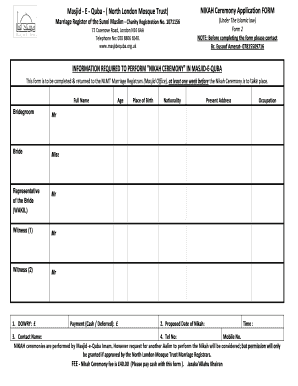
- Click ‘Get Form’ button to access the Nikah ceremony application form and open it in the editor.
- Enter the full name of the bridegroom. If applicable, indicate their title such as Mr or if you are representing the bride, choose WAKIL.
- Fill in the full name of the bride. Again, be sure to specify their title as Miss or WAKIL if needed.
- Provide the names of the two witnesses, ensuring to include their titles as Mr.
- In the dowry section, state the amount in pounds (£). Provide the contact name of the individual responsible for the dowry.
- Indicate the proposed date and time for the Nikah ceremony.
- Fill in the present address of both the bridegroom and the bride, along with their place of birth and nationality.
- Complete the occupation fields for both parties.
- Include telephone and mobile contact numbers.
- Make the necessary payment of £40.00 through cash and ensure you submit the completed form to the Masjid Office at least one week before the scheduled ceremony.
- Once completed, ensure to save changes, download, print, or share the form as necessary.
Complete your Masjid E Quba documents online today!
The prophet said: "You do not force yourself for preparation of visiting except these three mosques: Al-Masjid an-Nabawi, Masjid al-Haram, and Al-Aqsa Mosque.