Loading
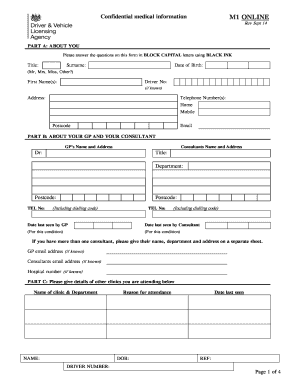
Get Dvla Medical Form M1
How it works
-

Open form follow the instructions
-

Easily sign the form with your finger
-

Send filled & signed form or save
How to fill out the Dvla Medical Form M1 online
Filling out the Dvla Medical Form M1 online is an important step for individuals seeking to ensure their medical fitness to drive. This guide will provide clear and accessible instructions to help you complete the form accurately and efficiently.
Follow the steps to complete your Dvla Medical Form M1 online:
- Click ‘Get Form’ button to obtain the form and open it in the editor.
- In Part A, provide your personal information. Answer all fields in BLOCK CAPITAL letters using BLACK INK. Include your title, surname, date of birth, first name(s), driver number (if known), address, telephone numbers, postcode, and email.
- In Part B, enter information regarding your general practitioner (GP) and any consultants you have seen. Include their names, addresses, and telephone numbers, as well as the dates you last saw them.
- In Part C, list any additional clinics you are attending. Provide the name of the clinic, department, reason for attendance, and date last seen.
- Complete the medical questionnaire which assesses your fitness to drive. Answer all questions regarding your medical conditions, medications, treatment history, and any issues related to alcohol or drug dependence.
- Review the consent section carefully. Sign and date the declaration to authorize the release of your medical information, agreeing to the terms outlined.
- Make sure you fill in and return all pages of the questionnaire. Review all information for accuracy before submission.
- After completing the form, you can save changes, download, print, or share the form as needed.
Complete your Dvla Medical Form M1 online today to ensure a smooth driving experience.
V1 Document Management System V1 adds advanced document referencing, optionally barcoding of documents and version control. V1 offers companies a long-term document management solution with auto hiving / destruction functionality and document storage security.