Loading
Get Scrschool
How it works
-

Open form follow the instructions
-

Easily sign the form with your finger
-

Send filled & signed form or save
How to fill out the Scrschool online
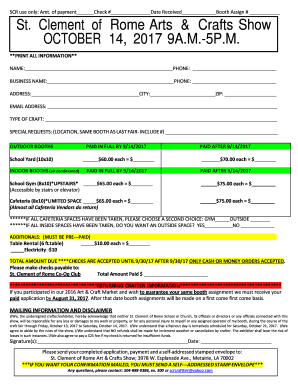
This guide provides users with comprehensive instructions on how to accurately complete the Scrschool form. By following these steps, users can ensure their submissions are clear and complete, facilitating a smooth process for participation in the event.
Follow the steps to effectively fill out the Scrschool form.
- Press the ‘Get Form’ button to access the form and begin filling it out.
- Fill in the 'Name' field with your full legal name. Ensure accuracy for identification purposes.
- Enter your 'Phone' number, making sure to include your area code. This information allows event coordinators to contact you if needed.
- Provide your 'Business Name' if applicable, followed by another contact 'Phone' number if different from your personal one.
- Complete the 'Address', 'City', and 'ZIP' fields with your current mailing address.
- Input your 'Email Address' to receive confirmation and important information regarding the event.
- Specify the 'Type of Craft' you will be showcasing at the event, ensuring that it aligns with the event’s standards.
- Include any 'Special Requests' you may have regarding your booth placement or setup, such as wishing to remain in the same booth as in previous events.
- Select your booth preference by checking the appropriate field for outdoor or indoor booth options along with the corresponding payment details.
- Indicate if you require any additional items such as table rentals or electricity by filling out the related sections.
- Review the 'Total Amount Due' section to confirm your payment details, ensuring to calculate the total fees based on your selections.
- Agree to the terms laid out in the mailing information and disclaimer section by providing your 'Signature' and the 'Date'.
- Print or save the completed form for your records before submitting it along with payment, ensuring the inclusion of a self-addressed stamped envelope if confirmation via mail is desired.
Complete your Scrschool form online today for a seamless registration experience!
What should be on the SCR All staff who work at the school, including teacher trainees on salaried routes and agency and third-party supply staff, even if they work for one day. For colleges, details of staff, including agency and supply staff providing education to children under the age of 18.
Industry-leading security and compliance
US Legal Forms protects your data by complying with industry-specific security standards.
-
In businnes since 199725+ years providing professional legal documents.
-
Accredited businessGuarantees that a business meets BBB accreditation standards in the US and Canada.
-
Secured by BraintreeValidated Level 1 PCI DSS compliant payment gateway that accepts most major credit and debit card brands from across the globe.