Loading
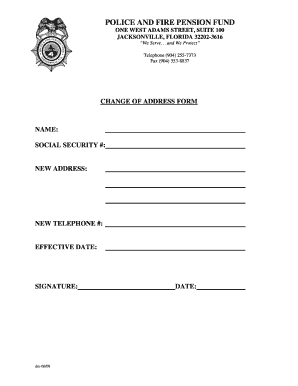
Get Change Of Address Form - Jacksonville
How it works
-

Open form follow the instructions
-

Easily sign the form with your finger
-

Send filled & signed form or save
How to fill out the CHANGE OF ADDRESS FORM - Jacksonville online
Filling out the Change of Address Form for Jacksonville is a straightforward process that helps ensure your contact information is updated efficiently. This guide walks you through each section of the online form, providing you with clear instructions for a seamless experience.
Follow the steps to complete the Change of Address Form online.
- Click ‘Get Form’ button to obtain the form and open it in the editor.
- Fill in your name in the designated field. Make sure to enter your full, legal name as it appears on official documents.
- Provide your social security number in the appropriate field. This information is needed to verify your identity.
- Enter your new address in the specified section. Include your street address, city, state, and zip code to ensure accurate delivery.
- Add your new telephone number in the field provided. This number will be used for any necessary follow-up communication.
- Indicate the effective date for the address change. Choose a date that appropriately reflects when you want the new address to take effect.
- Sign the form in the designated area to confirm that the information provided is accurate and complete.
- Enter the date on which you are completing the form in the appropriate field.
- Finally, save your changes, download a copy for your records, print the form, or share it as needed.
Complete your Change of Address Form online to ensure your information is updated quickly and accurately.
ing to USPS, the service can initially forward mail for 15 days to six months (185 days). If customers plan to stay at their temporary address for longer than six months and wish to continue forwarding mail, they must extend the temporary forwarding period.