Loading
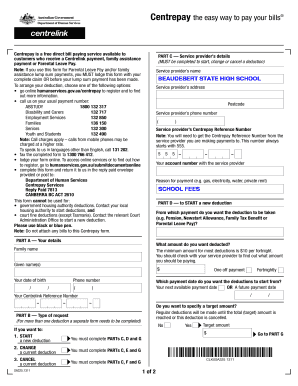
Get Centrepay Deduction Form 2017 - Beaudesert State High School
How it works
-

Open form follow the instructions
-

Easily sign the form with your finger
-

Send filled & signed form or save
How to fill out the Centrepay Deduction Form 2017 - Beaudesert State High School online
This guide provides comprehensive instructions on completing the Centrepay Deduction Form 2017 for Beaudesert State High School online. By following these steps, you can easily and accurately fill out your form and ensure your payments are arranged properly.
Follow the steps to complete your Centrepay Deduction Form efficiently.
- Click the ‘Get Form’ button to download the Centrepay Deduction Form. This will allow you to open it in an appropriate document editor to fill it out.
- In Part A, enter your details. Provide your family name, given name(s), date of birth, phone number, and your Centrelink Reference Number.
- Choose the amount you want deducted in Part A. The minimum amount for most deductions is $10 per fortnight. Additionally, specify the payment date when you want the deductions to begin.
- In Part B, indicate whether you are starting a new deduction, changing an existing deduction, or canceling a current deduction. Fill out the corresponding sections for your choice.
- In Part C, provide the service provider’s details, including Beaudesert State High School's name, address, phone number, and Centrepay Reference Number, which starts with 555. Also, include your account number with the service provider.
- In Part D, if you are starting a new deduction, specify the payment type from which the deduction will occur.
- If you are changing or canceling a current deduction, complete the relevant parts (E or F) and provide the necessary details such as the new deduction amount or the cancellation date.
- In Part G, read the authorization statement, and if you agree, sign and date the form to complete your submission.
- You can save your changes, download a copy, print the form, or share it for submission.
Complete your Centrepay Deduction Form online today for a seamless payment experience.