Loading
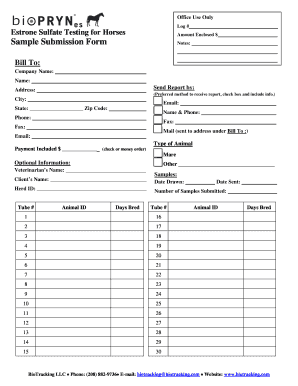
Get Log # Sulfate Testing For Horses Sample Submission ...
How it works
-

Open form follow the instructions
-

Easily sign the form with your finger
-

Send filled & signed form or save
How to fill out the Log # Sulfate Testing For Horses Sample Submission online
Filling out the Log # Sulfate Testing For Horses Sample Submission is essential for collecting accurate data regarding sulfate levels in horses. This guide provides clear, step-by-step instructions to help you complete the form efficiently and effectively.
Follow the steps to complete your sample submission form online.
- Press the ‘Get Form’ button to obtain the Log # Sulfate Testing For Horses Sample Submission and open it in your chosen editor.
- In the 'Log #' section, enter the unique identification number associated with your submission.
- Indicate the amount enclosed by filling in the 'Amount Enclosed $' field with your payment amount.
- Fill in the 'Bill To' section, which requires the 'Company Name', 'Name', and the 'Address', including 'City', 'State', and 'Zip Code'.
- Choose a preferred method for receiving the report by checking the appropriate box and providing the corresponding information.
- In the 'Name & Phone' section, provide your name and phone number. Additionally, if you wish to receive a report via fax, complete the 'Fax' field.
- Select the type of animal by indicating 'Mare' or other types in the 'Type of Animal' field.
- If applicable, provide optional information in the 'Optional Information' section, including 'Veterinarian’s Name', 'Client’s Name', and 'Herd ID'.
- For each sample you are submitting, fill in the 'Tube #' and 'Animal ID' for each corresponding sample, alongside the 'Days Bred' field.
- Specify the 'Date Drawn' and 'Date Sent' for the samples to track the sample submission timeline.
- Complete the 'Number of Samples Submitted' section, indicating how many samples you are sending.
- After filling out all necessary fields, review your information for accuracy, then save your changes, and either download, print, or share the completed form as needed.
Start completing your document online now.
an official record of something: keep a log (of sth) You should keep a log of your business travel to ensure you have proof of your expenses.
Industry-leading security and compliance
US Legal Forms protects your data by complying with industry-specific security standards.
-
In businnes since 199725+ years providing professional legal documents.
-
Accredited businessGuarantees that a business meets BBB accreditation standards in the US and Canada.
-
Secured by BraintreeValidated Level 1 PCI DSS compliant payment gateway that accepts most major credit and debit card brands from across the globe.