Loading
Get Cdass Program
How it works
-

Open form follow the instructions
-

Easily sign the form with your finger
-

Send filled & signed form or save
How to fill out the Cdass Program online
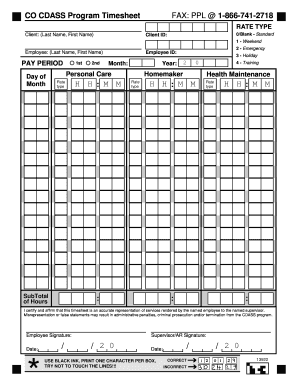
Filling out the Cdass Program efficiently is essential for ensuring accurate reporting of services rendered. This guide provides clear and supportive instructions for completing the necessary online form, making the process smooth and straightforward for all users.
Follow the steps to complete the Cdass Program form online
- Press the ‘Get Form’ button to access the Cdass Program form and open it in your preferred online editor.
- Begin by entering the client’s last name and first name in the designated fields. Ensure accuracy to avoid processing delays.
- Input the client ID in the specified section to properly associate the timesheet with the correct client. This is crucial for record-keeping.
- Specify the rate type for the employee by selecting from the provided options: Standard, Weekend, Emergency, Holiday, or Training. Choose the appropriate rate that applies.
- For the pay period, indicate the day and month at the beginning of the period being reported, and ensure the year is correct.
- Document the subtotal of hours worked under the relevant rate type. It's important to accurately record all hours to reflect the services rendered.
- The employee must certify the accuracy of the information entered by signing and dating the form in the designated fields.
- Obtain the supervisor or authorized representative's signature and date. This confirmation strengthens the validity of the timesheet.
- Once all sections are completed, review the form for any errors. You can then save your changes, download the completed document, print it for physical submission, or share it as needed.
Complete your Cdass Program form online today for efficient service tracking and accurate reporting.
The CDASS website has the most current information regarding upcoming trainings for the program. For questions and assistance applying, you can contact your Single Entry Point or our office at 303-333-3482.