Loading
Get Mosaic Catalogue Worksheet - Central Nsw Museums
How it works
-

Open form follow the instructions
-

Easily sign the form with your finger
-

Send filled & signed form or save
How to use or fill out the Mosaic Catalogue Worksheet - Central NSW Museums online
The Mosaic Catalogue Worksheet is an essential tool for documenting items in Central NSW museums. This guide provides clear and detailed instructions on completing the worksheet effectively and accurately.
Follow the steps to fill out the Mosaic Catalogue Worksheet online.
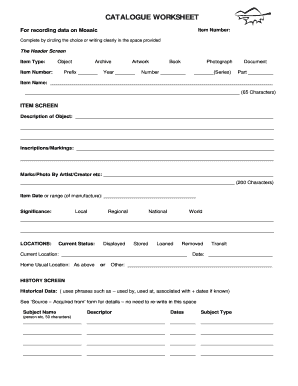
- Press the ‘Get Form’ button to access the Mosaic Catalogue Worksheet and open it in your preferred editor.
- Begin with the header screen. Select the item type from the available options: Object, Archive, Artwork, Book, or Photograph. Enter the item number in the space provided.
- For the 'Item Name', write a clear and concise title that does not exceed 65 characters.
- In the 'Description of Object' section, provide a detailed account of the item, including any relevant inscriptions or markings.
- If applicable, note any marks or photographs by the artist or creator, keeping to the 200 character limit.
- Indicate the item date or range of manufacture in the designated field.
- Fill out the 'Significance' section by circling the relevant category: Local, Regional, National, or World.
- In the locations section, specify the current status of the item: Displayed, Stored, Loaned, or Removed, and provide the current location.
- Enter the date of recording in the 'Date' field. If the item is in transit, indicate this appropriately.
- For historical data, mention any relevant associations and dates without repeating the source details previously noted.
- In the comments/provenance/associations section, provide any additional relevant notes.
- Move to the research screen to document materials, size, and dimensions in cm/mm.
- Record any references or bibliographies under the classification section. Select the primary, secondary, and tertiary types or themes as applicable.
- Indicate whether the data was manually recorded or computer entered. Ensure to assess and document the scanned image status.
- Complete the manual activities section, marking yes or no as applicable for various reports and printed labels.
- Review the overall physical and visual condition of the item and select the appropriate codes, entering any surveyed conditions.
- Finalize by documenting who completed the survey and ensuring all sections are filled before saving your changes, downloading, printing, or sharing the form.
Begin filling out the Mosaic Catalogue Worksheet online today for accurate documentation.
The fields include Object ID, Object Name, Collection, Source, Material, Site Name, Permanent and Temporary Locations, Provenance, Detailed Description, Dimensions, Place of Origin, Early and Late Dates, Condition, Status, Maintenance Cycle Information, Appraisal History, and Detailed Notes.