Loading
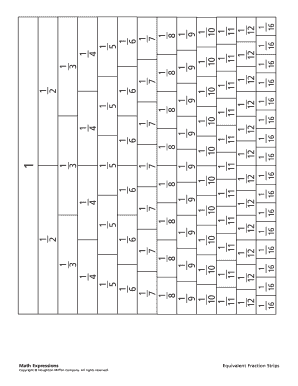
Get Equivalent Fraction Strips
How it works
-

Open form follow the instructions
-

Easily sign the form with your finger
-

Send filled & signed form or save
How to fill out the Equivalent Fraction Strips online
Filling out the Equivalent Fraction Strips online can enhance your understanding of fractions and their equivalences. This guide provides clear instructions on how to complete the form effectively and efficiently.
Follow the steps to successfully complete the Equivalent Fraction Strips
- Click the ‘Get Form’ button to access the Equivalent Fraction Strips and open the document in the editor.
- Begin by identifying your starting fraction in the first section of the form. This will be the foundation for creating equivalent fractions.
- For each fraction, locate the corresponding sections where you will input equivalent fractions. Follow the corresponding boxes to ensure accurate representation.
- Double-check each entry to confirm that all equivalent fractions have been filled correctly. You may provide additional notes if necessary.
- Once you have filled out the form completely, you have options to save changes, download, print, or share the Equivalent Fraction Strips.
Start completing the Equivalent Fraction Strips online today for a better grasp of fractions!
Fraction strips (or fraction bars or tiles) help students see that the same “whole” can be broken up into different equal-size parts. When students move the strips and put them side by side, they can visualize the fractional amounts.