Loading
Get Ssa-7004-sm 2003-2026
This website is not affiliated with any governmental entity
How it works
-

Open form follow the instructions
-

Easily sign the form with your finger
-

Send filled & signed form or save
How to fill out the SSA-7004-SM online
Filling out the SSA-7004-SM form online is an essential step to request your Social Security Statement. This guide will provide you with clear instructions to help you navigate through the process comfortably and efficiently.
Follow the steps to complete the SSA-7004-SM form online.
- Click ‘Get Form’ button to access the SSA-7004-SM form and open it in the editing interface.
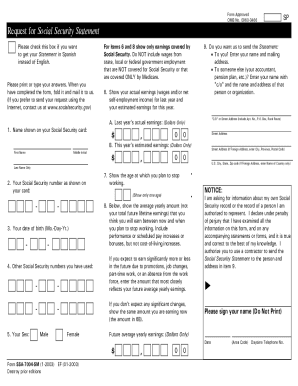
- In the first section, you will need to enter your name as it appears on your Social Security card. Ensure that all answers are printed or typed clearly for easy reading.
- Provide your Social Security number in the next field as shown on your card, followed by your date of birth formatted as month, day, and year.
- If applicable, list any other Social Security numbers you have previously used in the designated space.
- Indicate your sex by selecting either 'Male' or 'Female' as per the options provided.
- For items six and eight, report only earnings covered by Social Security. In item six, provide your last year’s actual earnings and this year’s estimated earnings in dollars.
- Specify the age at which you plan to stop working in item seven, ensuring that you only show one age.
- In item eight, input the future average yearly earnings you expect to earn between now and your planned retirement age, including any expected pay increases.
- If you want your Statement sent to someone else (like a partner or accountant), provide their name and address in item nine.
- Finally, review your information for accuracy, sign the form, and date it. After completing the form, you can save changes, download, or print it as needed.
Begin filling out the SSA-7004-SM online now to request your Social Security Statement.
You can get your personal Social Security Statement online by using your my Social Security account. If you don't yet have an account, you can easily create one. Your online Statement gives you secure and convenient access to your earnings records.