Loading
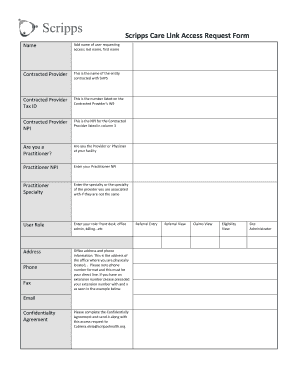
Get Scripps Care Link
How it works
-

Open form follow the instructions
-

Easily sign the form with your finger
-

Send filled & signed form or save
How to fill out the Scripps Care Link online
This guide provides clear instructions on how to complete the Scripps Care Link Access Request Form online. By following these steps, you can ensure that your application is submitted accurately and efficiently.
Follow the steps to complete your Scripps Care Link Access Request Form.
- Press the ‘Get Form’ button to access the Scripps Care Link Access Request Form and open it for editing.
- Begin by entering your name in the designated field, ensuring to include your last name followed by your first name.
- In the 'Contracted Provider' section, input the name of the entity you are associated with that is contracted with Scripps Health Plan Services (SHPS).
- Locate and enter the 'Contracted Provider Tax ID', which is the number listed on the Contracted Provider's W9 form.
- Enter the 'Contracted Provider NPI' number as relevant for the provider listed in the previous step.
- Indicate whether you are a practitioner by selecting 'Yes' or 'No'. If you are a provider or physician at your facility, select 'Yes'.
- If you indicated you are a practitioner, enter your Practitioner NPI in the corresponding field.
- Complete the 'Practitioner Specialty' field by entering your specialty or the specialty of the provider you are associated with, if it differs.
- Fill in your 'User Role' by specifying your job position, such as front desk, office admin, or billing.
- Provide your office address and phone information in the designated fields, ensuring that you follow the specified phone number format. If applicable, include your extension number preceded by an 'x'.
- Complete the sections for phone, fax, and email with the appropriate information.
- Read and carefully complete the Confidentiality Agreement. Send it along with your access request to the provided email address.
- Under the 'Information Systems Access Request' section, select your request type and indicate the type of terminal needed for remote access.
- Enter the last four digits of your Social Security Number and your date of birth in the respective fields.
- Review the Security Agreement, initial each condition to indicate your understanding and acceptance, then provide your signature and date.
- If applicable, obtain and enter your supervisory or managerial approval by providing the supervisor’s name, department, signature, phone number, and date.
- Once all sections are completed, save your changes. You may then download, print, or share the form as necessary.
Complete your Scripps Care Link Access Request Form online today to ensure timely processing of your application.
Request records online Log in to MyScripps and look for Request Medical Record and complete the steps for the Authorization for Disclosure of Health Information. Additionally, we've put together an informational webpage on how to understand medical records, how to read the notes and what to do if you have a question.