Loading
Get Sony Music Entertainment Forms
How it works
-

Open form follow the instructions
-

Easily sign the form with your finger
-

Send filled & signed form or save
How to fill out the Sony Music Entertainment Forms online
Filling out the Sony Music Entertainment Forms online can seem daunting, but with the right guidance, you can complete it efficiently. This guide will provide you with detailed instructions for each section and field of the form to ensure a smooth submission process.
Follow the steps to fill out the Sony Music Entertainment Forms online
- Click ‘Get Form’ button to obtain the form and open it in the designated area.
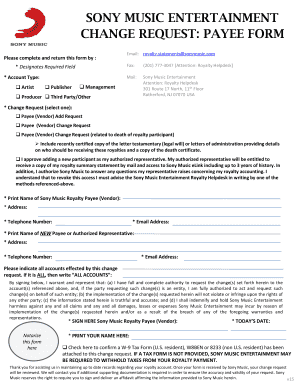
- Identify the required fields indicated with an asterisk (*). Begin by selecting the account type that applies to you: Publisher, Artist, Management, Producer, or Third Party/Other.
- Choose the change request type by selecting one of the following options: Payee (Vendor) Add Request, Payee (Vendor) Change Request, or Payee (Vendor) Change Request related to the death of a royalty participant. If selecting the last option, be prepared to attach a certified copy of the legal will or administrator letters along with a copy of the death certificate.
- Print your name as the Sony Music Royalty Payee (Vendor) in the designated field, followed by your address, email address, and telephone number.
- If applicable, print the name, address, telephone number, and email address of the new payee or authorized representative.
- Indicate all accounts affected by this change request. If it affects all accounts, write 'ALL ACCOUNTS'.
- Sign the form where indicated to confirm your authority to request the change, ensuring you understand the warranties included in the form.
- Enter today's date in the specified field and print your name again.
- Check the box to confirm that an appropriate W-9 Tax Form or equivalent has been attached to avoid tax withholdings on your royalty payment.
- Once all fields are accurately completed, you can save, download, print, or share the document as needed before submitting it.
Complete your Sony Music Entertainment Forms online today to ensure a seamless update of your records.
Sony is large and decentralized, with divisions and groups that are sometimes described as independent fiefdoms. This is often an effective structure for fostering innovations, because each division can make its own experiments and pursue its own ideas with fewer layers of approval.
Industry-leading security and compliance
US Legal Forms protects your data by complying with industry-specific security standards.
-
In businnes since 199725+ years providing professional legal documents.
-
Accredited businessGuarantees that a business meets BBB accreditation standards in the US and Canada.
-
Secured by BraintreeValidated Level 1 PCI DSS compliant payment gateway that accepts most major credit and debit card brands from across the globe.