We use cookies to improve security, personalize the user experience, enhance our marketing activities (including cooperating with our marketing partners) and for other business use.
Click "here" to read our Cookie Policy. By clicking "Accept" you agree to the use of cookies. Read less
Read more
Accept
Loading
Form preview
  • US Legal Forms
  • Form Library
  • More Forms
  • More Uncategorized Forms
  • Application For Net Metering (scheme 01)/ Net Accounting (scheme...

Get Application For Net Metering (scheme 01)/ Net Accounting (scheme...

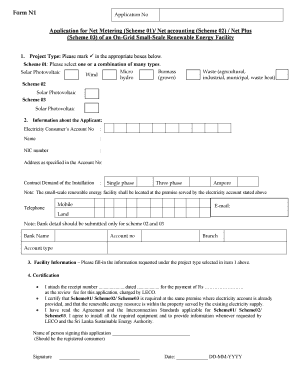
Form N1 Application No Application for Net Metering (Scheme 01)/ Net accounting (Scheme 02) / Net Plus (Scheme 03) of an OnGrid SmallScale Renewable Energy Facility 1. Project Type: Please mark in.

How it works

  1. Open form

    Open form follow the instructions

  2. Easily sign form

    Easily sign the form with your finger

  3. Share form

    Send filled & signed form or save

How to fill out the Application For Net Metering (Scheme 01)/ Net Accounting (Scheme...) online

Filling out the Application for Net Metering (Scheme 01)/ Net Accounting (Scheme...) is an important step for users looking to connect their renewable energy facilities to the grid. This guide will provide you with clear instructions to navigate the online application process effectively.

Follow the steps to complete your application online.

  1. Click ‘Get Form’ button to acquire the application and open it for editing.
  2. Select the project type from the list provided. Mark the appropriate boxes for Scheme 01, Scheme 02, or Scheme 03, indicating the renewable energy sources applicable, including solar photovoltaic, micro hydro, wind, biomass, or waste.
  3. Fill in your personal information in the applicant section. This includes the electricity consumer's account number, your name, NIC number, address as per the account, and contract demand details. Specify whether your installation is single-phase or three-phase and the amperage.
  4. If applicable, provide your mobile and telephone numbers, and email address. Note that bank details are needed only for Scheme 02 and Scheme 03.
  5. Complete the facility information by entering the details requested under the selected project type. Ensure all relevant data is accurate and complete.
  6. Certify the application by attaching the receipt number for the payment of the review fee. Confirm that the installation will take place at the premise served by the specified electricity account and that all conditions related to the agreement and interconnection standards are accepted.
  7. Provide the necessary additional information and requirements, including the signature and date. This section may also require details about the installer and necessary documentation.
  8. Compile and attach all required documents such as the circuit diagram, compliance certificates, protective device settings, and proposals for maximum generation.
  9. Finalize your application by saving your changes. You can choose to download, print, or share the completed form as needed.

Submit your completed application online to initiate the net metering or net accounting process.

Get form

Experience a faster way to fill out and sign forms on the web. Access the most extensive library of templates available.
Get form

Related content

Net Metering Programs - OSTI.gov
by YH Wan · 1996 · Cited by 13 — enter for Energy Analysis and Applications. Natiomil...
Learn more
Net Metering Programs - OSTI.gov
enter for Energy Analysis and Applications. Natiomil Renewable ... net metering.1 The...
Learn more
Carbon credit - Wikipedia
A carbon credit is a generic term for any tradable certificate or permit representing the...
Learn more

Related links form

2016 Sample Fundraising Letter - ALS Of Michigan - Alsofmichigan Sales Tax Exempt Form 2019 Uta Tax Exempt Form Central Council For Research In Yoga & Naturopathy, An Autonomous ...

Questions & Answers

Get answers to your most pressing questions about US Legal Forms API.

Contact support

In front of the meter batteries are integrated into the electricity network. There are currently twelve on the grid and they support the network by smoothing energy flows. A behind the meter battery sits on a customer's property and is not integrated into the electricity network.

FTM batteries are linked to transmission or distribution networks, or associated with electricity generation assets. BTM batteries are connected to the back of utility meters in residential, commercial, and industrial sectors. They enable electricity bill savings.

The main difference between virtual net metering and behind the meter solar is where the electricity is produced compared to where it is consumed. In both cases, the electricity is generated and interacts with the grid, but the final destination of the energy determines how the process is classified.

Disadvantages of net metering Makes electricity pricier for homes that don't generate their own power. Can work to the disadvantage of low-income households and small businesses. Makes it harder for utilities to schedule power generation.

The main difference between these two compensation programs is what you receive for your energy exports. Net metering will compensate you at the retail rate, whereas net billing will compensate you at the lesser supply or wholesale rate.

What Is Net Metering? Net metering is a billing mechanism that credits solar energy system owners for the electricity they add to the grid. For example, if a residential customer has a PV system on their roof, it may generate more electricity than the home uses during daylight hours.

In simple terms, behind the meter refers to anything that happens onsite, on the energy user's side of the meter. Conversely, anything that happens on the grid side is deemed to be in front of the meter.

Get This Form Now!

Use professional pre-built templates to fill in and sign documents online faster. Get access to thousands of forms.
Get form
If you believe that this page should be taken down, please follow our DMCA take down processhere.

Industry-leading security and compliance

US Legal Forms protects your data by complying with industry-specific security standards.
  • In businnes since 1997
    25+ years providing professional legal documents.
  • Accredited business
    Guarantees that a business meets BBB accreditation standards in the US and Canada.
  • Secured by Braintree
    Validated Level 1 PCI DSS compliant payment gateway that accepts most major credit and debit card brands from across the globe.
Get Application For Net Metering (Scheme 01)/ Net Accounting (Scheme...
Get form
Form Packages
Adoption
Bankruptcy
Contractors
Divorce
Home Sales
Employment
Identity Theft
Incorporation
Landlord Tenant
Living Trust
Name Change
Personal Planning
Small Business
Wills & Estates
Packages A-Z
Form Categories
Affidavits
Bankruptcy
Bill of Sale
Corporate - LLC
Divorce
Employment
Identity Theft
Internet Technology
Landlord Tenant
Living Wills
Name Change
Power of Attorney
Real Estate
Small Estates
Wills
All Forms
Forms A-Z
Form Library
Customer Service
Terms of Service
Privacy Notice
Legal Hub
Content Takedown Policy
Bug Bounty Program
About Us
Help Portal
Legal Resources
Blog
Affiliates
Contact Us
Delete My Account
Site Map
Industries
Forms in Spanish
Localized Forms
State-specific Forms
Forms Kit
Legal Guides
Real Estate Handbook
All Guides
Prepared for You
Notarize
Incorporation services
Our Customers
For Consumers
For Small Business
For Attorneys
Our Sites
US Legal Forms
USLegal
FormsPass
pdfFiller
signNow
airSlate WorkFlow
DocHub
Instapage
Social Media
Call us now toll free:
+1 833 426 79 33
As seen in:
  • USA Today logo picture
  • CBC News logo picture
  • LA Times logo picture
  • The Washington Post logo picture
  • AP logo picture
  • Forbes logo picture
© Copyright 1997-2025
airSlate Legal Forms, Inc.
3720 Flowood Dr, Flowood, Mississippi 39232
Form Packages
Adoption
Bankruptcy
Contractors
Divorce
Home Sales
Employment
Identity Theft
Incorporation
Landlord Tenant
Living Trust
Name Change
Personal Planning
Small Business
Wills & Estates
Packages A-Z
Form Categories
Affidavits
Bankruptcy
Bill of Sale
Corporate - LLC
Divorce
Employment
Identity Theft
Internet Technology
Landlord Tenant
Living Wills
Name Change
Power of Attorney
Real Estate
Small Estates
Wills
All Forms
Forms A-Z
Form Library
Customer Service
Terms of Service
Privacy Notice
Legal Hub
Content Takedown Policy
Bug Bounty Program
About Us
Help Portal
Legal Resources
Blog
Affiliates
Contact Us
Delete My Account
Site Map
Industries
Forms in Spanish
Localized Forms
State-specific Forms
Forms Kit
Legal Guides
Real Estate Handbook
All Guides
Prepared for You
Notarize
Incorporation services
Our Customers
For Consumers
For Small Business
For Attorneys
Our Sites
US Legal Forms
USLegal
FormsPass
pdfFiller
signNow
airSlate WorkFlow
DocHub
Instapage
Social Media
Call us now toll free:
+1 833 426 79 33
As seen in:
  • USA Today logo picture
  • CBC News logo picture
  • LA Times logo picture
  • The Washington Post logo picture
  • AP logo picture
  • Forbes logo picture
© Copyright 1997-2025
airSlate Legal Forms, Inc.
3720 Flowood Dr, Flowood, Mississippi 39232