Loading
Get Rfw1
How it works
-

Open form follow the instructions
-

Easily sign the form with your finger
-

Send filled & signed form or save
How to fill out the Rfw1 online
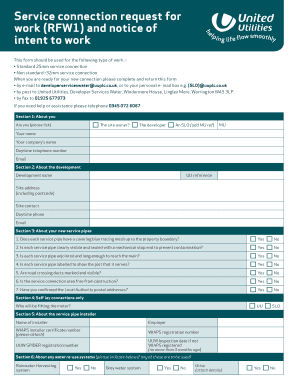
Filling out the Rfw1 form is an essential step for requesting a water service connection. This guide provides a clear and supportive roadmap to help you successfully complete the form online.
Follow the steps to accurately complete the Rfw1 form.
- Press the ‘Get Form’ button to access the Rfw1 online form and open it in your preferred document editor.
- In section 1, provide your details as the site owner. Indicate if you are the developer or a self-lay operator (SLO) by ticking the appropriate box. Fill in your name, company name, daytime telephone number, and email address.
- In section 2, enter details about your development. Complete fields including development name, United Utilities (UU) reference, site address with postal code, site contact person, and their daytime phone and email.
- Proceed to section 3, which focuses on your new service pipes. Answer the yes/no questions regarding the cover and visibility of each service pipe, their length and labeling, the marking of road crossing ducts, the obstructions in the service connection area, and whether you have confirmed the Local Authority postal addresses.
- If applicable, complete section 4 by indicating who will fit the meter (either UU or SLO).
- Section 5 requires information about the service pipe installer. Fill in the name of the installer, their employer, WIAPS installer certificate number (attach if available), WIAPS registration number, UUW SPIDER registration number, and the UUW inspection date if not WIAPS registered.
- In section 6, indicate if any water reuse systems will be used, including options for rainwater harvesting, grey water systems, or others. Attach details if necessary.
- Section 7 pertains to new connections. Specify the type of metering arrangement, internal arrangements as per AU specifications, proposed connection date, and postal address as per Local Authority listings.
- In section 8, answer the questions about testing and traffic management, including the attachment of valid certificates for disinfection and pressure tests, water sample pass certificate, and any traffic management restrictions.
- Finally, in section 9, read the declaration carefully. By submitting the form, you confirm compliance with UU specifications and authority to request new connections. Fill in your name, company, signature, and date.
- Once all sections are completed, you can save changes, download, print, or share the filled-out form as needed.
Start filling out the Rfw1 form online today for a smooth service connection process.
Industry-leading security and compliance
US Legal Forms protects your data by complying with industry-specific security standards.
-
In businnes since 199725+ years providing professional legal documents.
-
Accredited businessGuarantees that a business meets BBB accreditation standards in the US and Canada.
-
Secured by BraintreeValidated Level 1 PCI DSS compliant payment gateway that accepts most major credit and debit card brands from across the globe.