Loading
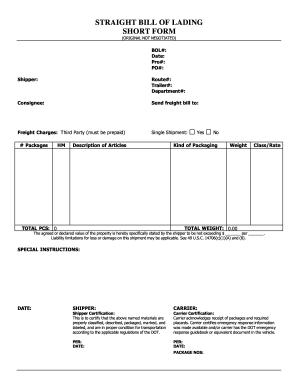
Get Straight Bill Of Lading Short Form
How it works
-

Open form follow the instructions
-

Easily sign the form with your finger
-

Send filled & signed form or save
How to fill out the Straight Bill of Lading Short Form online
The Straight Bill of Lading Short Form is a crucial document used in the transportation of goods. This guide will provide you with step-by-step instructions on how to accurately complete the form online, ensuring all necessary details are properly submitted.
Follow the steps to complete the Straight Bill of Lading Short Form online.
- Click the ‘Get Form’ button to access the Straight Bill of Lading Short Form and open it in your online editor.
- In the 'BOL#' section, enter the bill of lading number. This is a unique reference for tracking the shipment.
- Input the shipper's information under the 'Shipper' section, including the name and address of the entity sending the shipment.
- Detail the route information such as route number in the 'Route#' section and specify the trailer number and department in their respective fields.
- Indicate where to send the freight bill in the 'Send freight bill to' section.
- Specify if this is a single shipment and enter the total number of packages under the '# Packages' field.
- Choose the kind of packaging used and fill in the details accordingly.
- Include any special instructions that are necessary for the carrier in the 'SPECIAL INSTRUCTIONS' field.
- Finally, review your entries for accuracy, then save your changes, download the form, print, or share it as needed.
Complete your forms online with confidence and ensure a smooth shipping process.
A straight bill of lading is a transport document that is non-negotiable, indicating that the goods are being shipped to a specific consignee. It serves as a receipt and a contract for the transport of goods. The straight bill of lading short form simplifies documentation by including only essential details, making it a favored choice for shippers who want to streamline their operations.