Loading
Get Rosemary Chiavetta
How it works
-

Open form follow the instructions
-

Easily sign the form with your finger
-

Send filled & signed form or save
How to fill out the Rosemary Chiavetta online
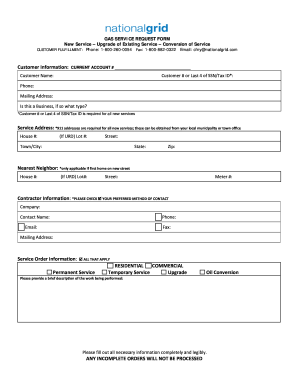
Filling out the Rosemary Chiavetta form online is a straightforward process essential for service requests. This guide provides clear instructions to help users accurately complete each section of the form.
Follow the steps to successfully complete the Rosemary Chiavetta form.
- Click ‘Get Form’ button to obtain the form and open it in your preferred online interface.
- Begin by providing your customer information. Enter your current account number, customer number, or the last four digits of your SSN or tax ID. Fill in your name, phone number, and mailing address. Indicate whether this request is for a business and specify the type.
- Next, fill out the service address. Complete all required fields including the house number, lot number if applicable, street name, town or city, state, and zip code. Ensure you include a 911 address if necessary.
- Under nearest neighbor information, fill out this section only if your home is the first on a new street. Provide their house number, lot number if applicable, and street name.
- In the contractor information section, fill out the company name, contact person's name, phone number, email, fax, and mailing address. Don’t forget to check your preferred method of contact.
- For the service order information, indicate all applicable options including whether you require permanent or temporary service, residential or commercial service, and if this is an upgrade or oil conversion.
- Provide a brief description of the works to be performed. Complete this section thoroughly as incomplete orders will not be processed.
- Fill out the service characteristics according to your needs. Indicate if you are requesting new service, conversion, or an upgrade, and provide additional information as required for each service type.
- For new service requests, include details such as foundation completion, structure framing status, estimated service request date, total load of BTUs, number of gas meters, and distance from the building to the street.
- When requesting an oil to gas conversion, provide total BTU load, number of gas meters, and appliance(s) to be converted. Ensure to mark all applicable appliances.
- If you are upgrading the service, provide current BTU load, total BTU load after upgrade, number of existing meters, and if you are adding or removing any meters, including documentation as necessary.
- Finally, you may include any additional comments in the designated section and review your completed form for accuracy.
- After completing the form, you can save changes, download, print, or share the form as necessary.
Ready to submit your request? Complete your forms online today!
PUC Funding and Budget Subject to budget approval, the PUC assesses utilities up to three-tenths of one percent of gross intrastate revenue to cover the cost of regulation. All assessments are paid into the General Fund of the State Treasury through the Department of Revenue for use solely by the Commission.