Loading
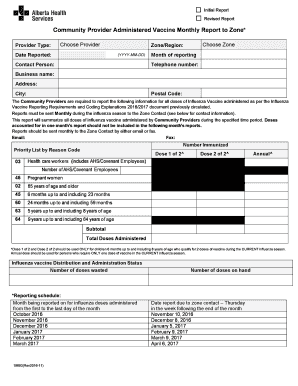
Get Community Provider Administered Vaccine Monthly Report To Zone Form
How it works
-

Open form follow the instructions
-

Easily sign the form with your finger
-

Send filled & signed form or save
How to fill out the Community Provider Administered Vaccine Monthly Report To Zone Form online
Filling out the Community Provider Administered Vaccine Monthly Report To Zone Form online is essential for accurate reporting of influenza vaccine doses administered by community providers. This guide provides clear, easy-to-follow steps to assist you in completing the form accurately.
Follow the steps to complete the form successfully.
- Press the ‘Get Form’ button to access the form and open it in the online editor.
- Begin by selecting your provider type from the dropdown menu labeled 'Choose Provider'. This identifies the organization or entity reporting the vaccine administration.
- Enter the date reported in the format YYYY-MM-DD. This indicates the date you are submitting the report.
- Select the appropriate zone or region in which you are reporting by clicking on 'Choose Zone'. This is crucial for ensuring the report is sent to the correct contact.
- Provide the contact person's full name and their telephone number. This information is required for any follow-up communication.
- Specify the business name and provide the complete address, including the city and postal code. This ensures the reporting organization is accurately represented.
- Fill out the section indicating the number immunized, breaking it down by the reasons as provided in the form, including categories such as infants, pregnant women, and health care workers.
- Ensure to input the number of doses wasted, as this information is necessary for inventory management.
- Review the summary section to verify the total doses administered and ensure all contributions from individual categories are accurately tallied.
- Finally, after double-checking all information entered, you can either save the changes, download the completed report, print it for records, or share it with the designated zone contact.
Complete your report online today to ensure accurate tracking of influenza vaccinations.
Industry-leading security and compliance
US Legal Forms protects your data by complying with industry-specific security standards.
-
In businnes since 199725+ years providing professional legal documents.
-
Accredited businessGuarantees that a business meets BBB accreditation standards in the US and Canada.
-
Secured by BraintreeValidated Level 1 PCI DSS compliant payment gateway that accepts most major credit and debit card brands from across the globe.