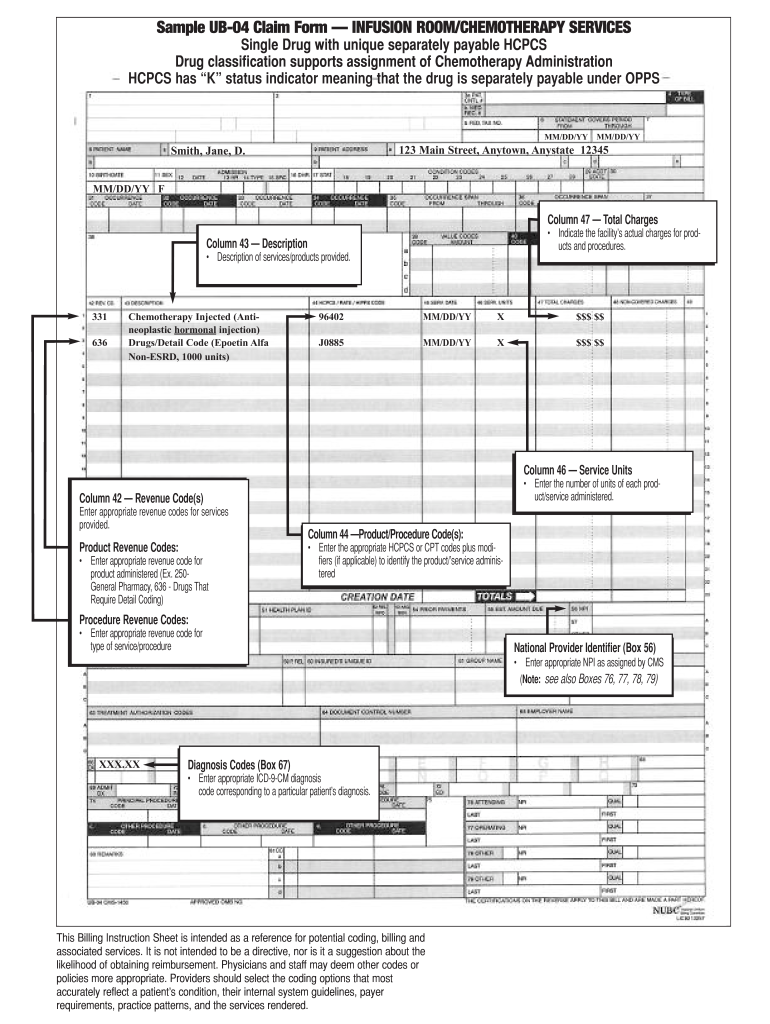
Sample UB-04 Claim Form INFUSION ROOM/CHEMOTHERAPY SERVICES Single Drug with unique separately payable HCPCS Drug classification supports assignment of Chemotherapy Administration HCPCS has K status indicator meaning that the drug is separately payable under OPPS MM/DD/YY Column 47 Total Charges Indicate the facility s actual charges for products and procedures. Column 43 Description Description of services/products provided* Chemotherapy Injected Antineoplastic hormonal injection Drugs/Detail Code Alfa Non-ESRD 1000 units 96402 J0885 X Product Revenue Codes Enter appropriate revenue code for product administered Ex. 250General Pharmacy 636 - Drugs That Require Detail Coding Enter the number of units of each product/service administered* Column 44 Product/Procedure Code s Enter the appropriate HCPCS or CPT codes plus modifiers if applicable to identify the product/ service administered Procedure Revenue Codes type of service/procedure XXX. XX Column 46 Service Units Column 42 Revenue ....

Open form follow the instructions

Easily sign the form with your finger

Send filled & signed form or save
How to use or fill out the Sample UB-04 Claim Form online
The Sample UB-04 Claim Form is an essential document used for billing various healthcare services, including infusion room and chemotherapy services. This guide provides a comprehensive overview of how to successfully complete this form online, ensuring accuracy and efficiency in the claims process.
Follow the steps to fill out the Sample UB-04 Claim Form online effectively.
- Click ‘Get Form’ button to obtain the form and open it in your preferred editor.
- Begin by filling in Column 42 for Revenue Code(s). Enter the appropriate revenue codes for the services provided, ensuring accuracy for reimbursement.
- In Column 43, provide a detailed description of the services or products administered during the patient’s visit.
- Moving to Column 44, enter the Product/Procedure Code(s). Utilize appropriate HCPCS or CPT codes plus any necessary modifiers to accurately identify the service administered.
- Complete Column 46 by entering the Service Units, denoting the quantity of each service that was rendered.
- In Column 47, indicate the facility’s Total Charges which reflect the actual fees for products and procedures performed.
- When filling out the Diagnosis Codes in Box 67, ensure you enter the correct ICD-9-CM diagnosis code that corresponds to the patient’s condition.
- Lastly, in Box 56 for the National Provider Identifier, enter the appropriate NPI assigned by CMS, paying attention to other related boxes (76, 77, 78, 79) as necessary.
- After completing all sections of the form, make sure to review your entries for accuracy, then save your changes, and choose to download, print, or share the form as required.
Start filling out your Sample UB-04 Claim Form online now to streamline your billing process.
Experience a faster way to fill out and sign forms on the web. Access the most extensive library of templates available.
Related content
Submission of this claim constitutes certification that the billing information as shown...
Listed below are important instructions and comments about filing a claim. YOUR CLAIM FORM...
2.3 UB-04 Claim Form. To view a sample Residential Health Care UB-04 claim form, see...
Get answers to your most pressing questions about US Legal Forms API.
How do I print something at UB?
Printing at UB, especially for claims forms, involves selecting the desired document you need, such as the Sample UB-04 Claim Form. After filling out the required information, ensure you access your printing options through the document viewer or software. Make sure your printer is set to handle the format correctly before confirming the print command. If you need templates, uslegalforms can help provide the necessary documents.
How do I indicate corrected claim on UB 04?
To indicate a corrected claim on the UB-04 form, you would typically use specific codes in the designated boxes to show that the submission is adjusted. This often involves entering a value in the appropriate box that signifies the correction made to the previous submission. Utilizing the Sample UB-04 Claim Form correctly is crucial in ensuring that the insurance provider understands the correction. It is advisable to consult resources like uslegalforms for detailed instructions.
What are the two types of claims forms?
The two main types of claims forms are the UB-04 form and the CMS-1500 form. The UB-04 form is used for institutional services, while the CMS-1500 form is tailored for outpatient services provided by individual healthcare professionals. Understanding these distinctions, including the specifics of the Sample UB-04 Claim Form, is critical for accurate billing and timely payment from insurers. Knowing when to use each form can streamline your claims process.
How do I get a UB-04 form pdf?
To obtain a PDF version of the UB-04 form, explore online resources that specialize in legal forms, such as uslegalforms. Many of these platforms offer downloadable PDFs of the Sample UB-04 Claim Form, which can be filled out electronically. After downloading, you can also print it directly from your PDF viewer. This ease of access ensures you can obtain the needed form without hassle.
How to print UB04 form?
To print a UB04 form, start by obtaining the Sample UB-04 Claim Form and filling it out completely. Once finished, select the print option and ensure that your printer is set to the correct paper size for the form. Do a final check of the print preview to ensure everything aligns properly. For templates and additional help, consider checking out uslegalforms to assist in the printing process.
How do I print an UB-04 form?
Printing an UB-04 form involves accessing a completed digital version of the Sample UB-04 Claim Form. Make sure to use a printer that supports the required dimensions for the form. After confirming all information is accurate, open the print menu and ensure the print preview looks correct. If you need more help, online resources like uslegalforms provide templates that streamline this process.
How do I print an UB 04 form?
To print an UB-04 form, first obtain a digital copy of the Sample UB-04 Claim Form, which you can find through established legal forms platforms like uslegalforms. After filling in the necessary information, select the print option from your document viewer. Confirm that your printer settings align with the form layout before printing. This step ensures a professional appearance of your claim submissions.
How do I print a 1500 claim form?
To print a 1500 claim form, you can download a blank template from a reliable source or access a software that supports claim management. Ensure your printer settings are correctly configured for the specific paper size required. Once the form is complete, press the print button and confirm the print preview shows the layout correctly. Resources like uslegalforms offer downloadable forms which can simplify this process.
Who is the UB-04 form used for?
The UB-04 form is primarily used by hospitals and other healthcare facilities to bill for services provided to patients. It is designed for institutional claims rather than individual healthcare providers. The Sample UB-04 Claim Form is beneficial when submitting charges for various services, including inpatient and outpatient care. Utilizing this form ensures that facilities accurately capture their services in billing submissions.
Is the UB-04 form universal?
While the UB-04 form is widely used across the United States, it is not universally applicable globally. The Sample UB-04 Claim Form is specifically designed for institutional healthcare billing in the US and follows industry standards recognized by government programs and private insurers. Understanding this form's usage helps streamline billing processes within the US healthcare system.
Use professional pre-built templates to fill in and sign documents online faster. Get access to thousands of forms.
If you believe that this page should be taken down, please follow our DMCA take down process here.