Loading
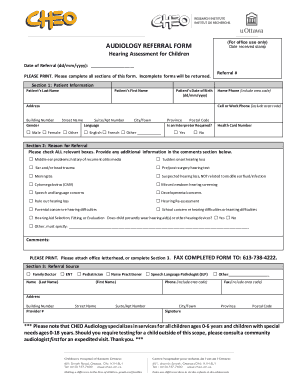
Get Audiology Referral Form Yes No - Cheo
How it works
-

Open form follow the instructions
-

Easily sign the form with your finger
-

Send filled & signed form or save
How to fill out the AUDIOLOGY REFERRAL FORM Yes No - CHEO online
This guide provides clear and detailed instructions on how to accurately fill out the AUDIOLOGY REFERRAL FORM Yes No - CHEO online. By following these steps, you will ensure that all required information is submitted correctly for a smooth referral process.
Follow the steps to complete your audiology referral form online:
- To begin, locate and press the ‘Get Form’ button to access the AUDIOLOGY REFERRAL FORM Yes No - CHEO. This will open the form within the digital editor.
- In Section 1, provide patient information. Fill in the patient's last name, first name, date of birth, and address, including building number, street name, suite/apt number, city/town, province, and postal code. Specify the patient's gender and preferred language. Indicate whether an interpreter is required and provide the health card number.
- In Section 2, indicate the reason for the referral by checking all relevant boxes. Additional information should be added in the comments section. If the child currently uses hearing aids or other devices, specify accordingly.
- In Section 3, provide the referral source details. Enter the name of the family doctor or other referring provider, including their phone number, fax number, address, and provider number. Ensure to include the signature of the referral source.
- Finally, review the completed form for accuracy. Once you have confirmed that all sections are filled out correctly, save your changes. You have the option to download, print, or share the completed form as needed.
Start filling out your AUDIOLOGY REFERRAL FORM Yes No - CHEO online today to ensure timely and efficient processing!
Get form
Experience a faster way to fill out and sign forms on the web. Access the most extensive library of templates available.
Get This Form Now!
Use professional pre-built templates to fill in and sign documents online faster. Get access to thousands of forms.